Answered
move tool flipping vertical and horizontal at the same time
I'm sure it's a setting that I just haven't found. When I grab the right side transform control to flip horizontal it flips vertically also. Where is this setting?

I'm sure it's a setting that I just haven't found. When I grab the right side transform control to flip horizontal it flips vertically also. Where is this setting?
Thank you. What I want to do is grab top right and be able to drag it left and up and make that narrow and tall. The buttons are not working independently.
Hold Shift to distort or turn off the constrain control in the options bar
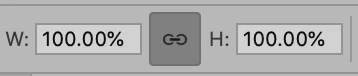
~ Jane
Already have an account? Login
Enter your E-mail address. We'll send you an e-mail with instructions to reset your password.
 AdChoices