
Participant
September 9, 2017
Answered

Move tool not working all of a sudden

  • September 9, 2017
  • 3 replies
  • 64447 views

I have CS5 on my mac.  Just yesterday my move tool stopped working.

When I add for example, a stone to a new layer and select the move tool, the square appears around the stone.

when i try to move the stone, nothing happens.  I can resize it, but not move it.

i am on the correct layer.

I had no problem doing this before.

Any suggestions are appreciated!!
This topic has been closed for replies.
Correct answer davescm

Hi Sandra

I'm slightly puzzled as, with Auto-Select unchecked then the Group/Layer option does nothing.

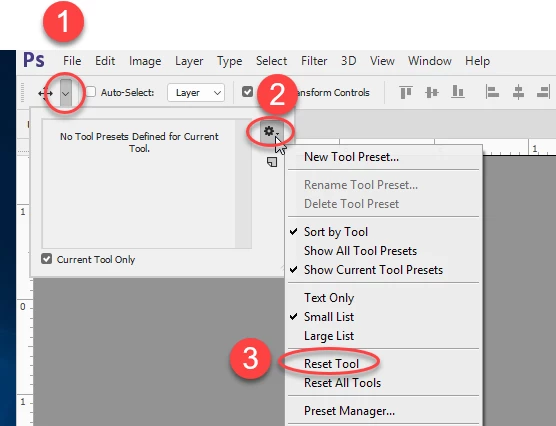
If the issue re-occurs with Auto-Select still unchecked try resetting the move tool :

Dave

3 replies

Participant
February 21, 2020

I just wanted to add to this as I was having this problem of the move tool resizing box not appearing all of a sudden. For me, I just had something selected from the wand/marquee tool that must have been so small that I couldn't see it. I hit CTRL+D to deselect and my move box reappeared.

Participant
July 6, 2020

Thanks. That worked for me and was much easier than the other suggestions - but then while I continued working the same issue kept recurring one in a while. While I love this quick tip I find the whole issue unsatsifactory and I woukld mark this discussion "unresolved" if I could. 

Participant
January 22, 2019

Good evening, I have Windows and I have installed Abode PS, I cant drag the circle that has text on the picture as background. I have tried all these experiences ypu hve wrote , also the reset and nothing happens. Any help for Windows?

davescm
Community Expert
Community Expert
September 21, 2019
Hi I'm not sure which circle you mean. Can you show a screenshot and describe further what it is you are trying to do.
Stephanie5D24
Participant
February 22, 2021

I have a Mac and have tried all of the above solutions without avail. The Marquee tool will select the image I'm trying to cut and drag to a separate tab, but it only shows the dotted outline when I drag it to the second tab. Any additional help? 

davescm
Community Expert
Community Expert
September 9, 2017

Hi Sandra

Could it be that you have auto-select layer switched on in the options bar and are trying to drag a transparent section of your layer?

If not, can you show a screenshot including your toolbar and options bar

Dave

sandrar16Author
Participant
September 9, 2017

Dave

thank you for responding.

because of your comment, i looked at the option bar.  i did not have auto select layer switched on, but i have Group vs Layer on.

now that i changed to group, it works.--at least for now!!

Thank you again!

davescm
Community Expert
davescmCommunity ExpertCorrect answer
Community Expert
September 9, 2017

Hi Sandra

I'm slightly puzzled as, with Auto-Select unchecked then the Group/Layer option does nothing.

If the issue re-occurs with Auto-Select still unchecked try resetting the move tool :

Dave