
nghiepl89407870
Participant
June 20, 2017
Answered

move tool problem

  • June 20, 2017
  • 2 replies
  • 616 views

i am using the photoshop cc 2017. When i try to use to Content Aware move tool to  move the object after selection. When i click and tried to move  the object, the object does not move at all, just only the selection boundary.

(I do the same procedure as instructed in the tutorial video but the tool does not work)

Can you show me how to fix it?

Thanks
    This topic has been closed for replies.
    Correct answer gener7

    First make sure the tutorial is for the version of Photoshop you are using.

    Be sure you are not on a blank or Adjustment layer. (easy to miss)

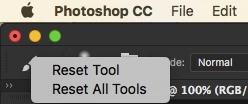
    Next, try a Tool reset by right clicking on the icon and choosing "Reset" as shown in the example.

    2 replies

    JJMack
    Community Expert
    Community Expert
    June 20, 2017

    Adobe resent CC 2017 update changed  the default options set for the move tool.  Auto select layer in not the default.  Make sure that is not interfering with what your doing.  Not changing Photoshop targeted layers on you.

    JJMack
    gener7
    Community Expert
    gener7Community ExpertCorrect answer
    Community Expert
    June 20, 2017

    First make sure the tutorial is for the version of Photoshop you are using.

    Be sure you are not on a blank or Adjustment layer. (easy to miss)

    Next, try a Tool reset by right clicking on the icon and choosing "Reset" as shown in the example.