
Inspiring
December 9, 2016
Answered

Move tool switching between objects and art board

  • December 9, 2016
  • 2 replies
  • 2373 views

The title sums this up.

I'm not pressing any additional keys, simply selecting the move tool, attempting to move the objects on the selected layer, and then it randomly switches to selecting the art board and moving it.

This topic has been closed for replies.
Correct answer davescm

Hi Josh
I can't answer for Adobe's software designers, I am a user the same as you.

A couple of things which may be helpful

The move tool cursor does change from the "arrow with a cross"  to the "black direct selection arrow" when you are at the edge of the artboard (if it shows the black arrow you will select the artboard).

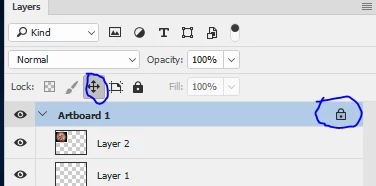
You can prevent the artboard from moving if it is accidentally selected by locking it's position in the layer panel.

Apologies if you already knew this - it may help someone else

Dave

2 replies

Feybird
Participant
August 24, 2022

The issue with using the move lock tool is that it also prevents basic transformation actions on all nested layers. 
Is there a way to just lock the art board itself as a stable canvas while not effecting the nested layers? 
This seems like an oversight. 

Thank you! 

davescm
Community Expert
Community Expert
December 9, 2016

When you say randomly, could it be that you are clicking on an object at the edge of an artboard. If you click on the edge the tool will move the artboard.

Dave

Inspiring
December 9, 2016

So let's say the answer is yes (which it actually is) should this still not be considered abnormal behavior?

If the software is making guesses on what we want to do with it, and then making choices for us, then I think that puts designers at a disadvantage.

davescm
Community Expert
davescmCommunity ExpertCorrect answer
Community Expert
December 9, 2016

Hi Josh
I can't answer for Adobe's software designers, I am a user the same as you.

A couple of things which may be helpful

The move tool cursor does change from the "arrow with a cross"  to the "black direct selection arrow" when you are at the edge of the artboard (if it shows the black arrow you will select the artboard).

You can prevent the artboard from moving if it is accidentally selected by locking it's position in the layer panel.

Apologies if you already knew this - it may help someone else

Dave