
Participant
July 7, 2022
Question

moving a selection without having layer selected returns "programm error"

  • July 7, 2022
  • 2 replies
  • 244 views

steps to replicate:

  1. create a selection
  2. switch to move tool
  3. click into empty void below all layers to select none
  4. press arrow keys to move content of selection


what happens:
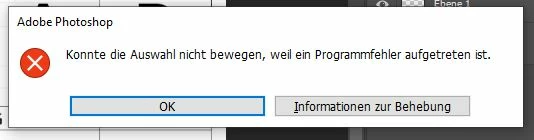
above is german the translation is:

Could not move the selection, because a programm error accured.


what I expected:

simmilar error as when you try to move a empty selection or try to use a brush without having a layer selected.

This topic has been closed for replies.

2 replies

Mike_Gondek10189183
Community Expert
Community Expert
July 25, 2022

I was able to reproduce and agree it should probably do something else to let you know you don't have a layer selected.


Illustrator has a UserVoice website you can report items like this, Photoshop I believe does not anymore, though they did as I remember posting there.


But you can submit a bug like this here, or I might be able to move your post there.

https://community.adobe.com/t5/forums/postpage/board-id/bug-photoshop

S_Gans
Community Expert
Community Expert
July 25, 2022

Hi. Can I ask why you're trying to do this with no layer selected? There's no need. When you have an active selection you can move that selection IF you're still on any selection tool. When you switch to the Move tool - Photoshop tries to move your pixels. If you have no layer focus, there are no pixels (and not even a lack of pixels) for Photoshop to move.

So, in the future, if you want to move your active selection, simply stay on the selection tool, until you're ready to take action on pixels. 

Adobe Community Expert / Adobe Certified Instructor