Participant
October 13, 2023
Answered

Moving an image from Lrc to Ps 2024

  • October 13, 2023
  • 3 replies
  • 961 views

Hllo

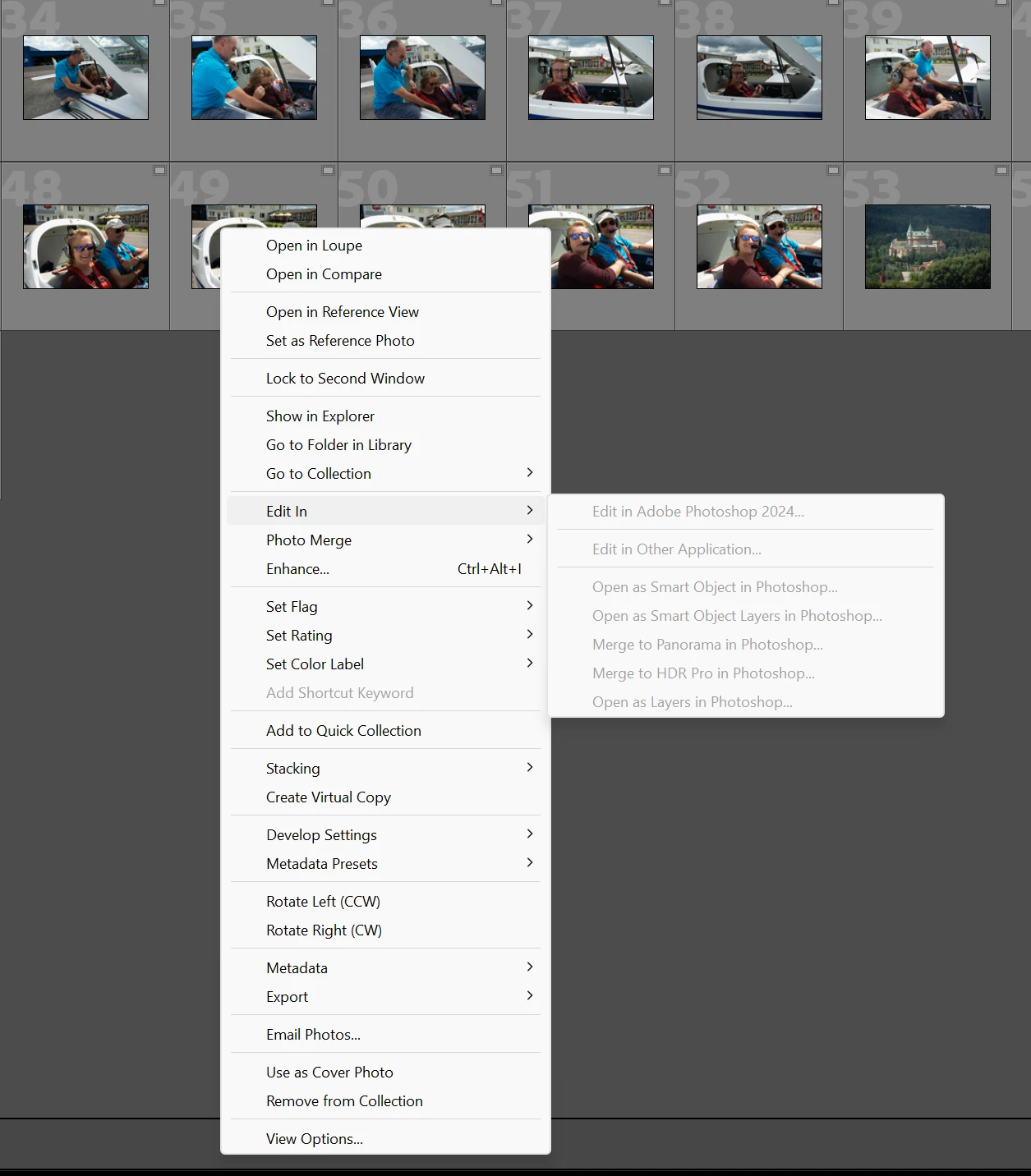
When I enter Lrc ​​Edit in Photoshop 2024, the line is gray. I have a new version of Lrc and Ps installed. In Preferences Lrc, I see External Editor Photoshop 2024. It still doesn't work.
 

Thank you

Miso

mp@aldona.sk
This topic has been closed for replies.
Correct answer Per Berntsen


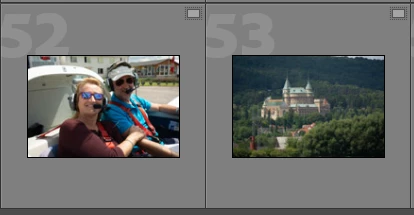
The icon in the top right corner of the thumbnails indicates that the original file is missing, and only a Smart preview is available. Smart previews cannot be sent to Photoshop for editing, you have to connect LrC with the originals.

See https://www.lightroomqueen.com/lightroom-photos-missing-fix/

3 replies

Per Berntsen
Community Expert
Per BerntsenCommunity ExpertCorrect answer
Community Expert
October 14, 2023


The icon in the top right corner of the thumbnails indicates that the original file is missing, and only a Smart preview is available. Smart previews cannot be sent to Photoshop for editing, you have to connect LrC with the originals.

See https://www.lightroomqueen.com/lightroom-photos-missing-fix/

Participating Frequently
February 29, 2024

Hi, I'm having a similar problem transferring from SD card to LR Classic to PS 2024 , PS is already open , I'veedited in LR, click edit in PS then this appears, after the second notification the image then opens in the already opened photoshop , baffling. I don't really want to go through this procedure everytime 

Community Expert
October 14, 2023

When the 'link' between Lightroom Classic and Photoshop has issues, the first step is to try this:

Use the Adobe Creative Cloud Application to uninstall Photoshop. When asked, keep preferences! After this reinstall Photoshop again.


If this doesn't help the nest step is to reinstall both apps Lightroom and Photoshop. Please folloe the steps below:


1. Open the Adobe Creative Cloud Desktop Client and uninstall both Photoshop and Lightroom Classic. When asked, keep preferences! 

2. Install Photoshop first and then Lightroom Classic. The right order is very important here!


If this doesn't help try the reinstallation with removing the preferences also.


My System: Intel i7-8700K - 64GB RAM - NVidia Geforce RTX 3060 - Windows 11 Pro 25H2 -- LR-Classic 15 - Photoshop 27 - Nik Collection 9 - PureRAW 6 - Topaz Photo AI
Bojan Živković11378569
Community Expert
Community Expert
October 14, 2023

From the tests I have conducted, I’ve observed that issues can arise when a file is not found in its original location. If the file is present and accessible, everything seems to function properly without any problems.