justino13092942
Participant
February 14, 2018
Answered

MS Paint color editor in Photoshop?

  • February 14, 2018
  • 2 replies
  • 646 views

I've recently noticed a issue (since probably at least a week ago) where clicking on a color in Photoshop only brings up the color editor from Microsoft Paint instead. To be clear, it doesn't open the MS Paint program too - its color editor just appears inside Photoshop for some reason instead of the one that would usually be there. It's literally 100% the same, so I'm guessing this has to be a glitch and not some weird setting that was accidentally turned on, but updating Photoshop didn't get rid of it and I can't seem to find any information about it. Has anyone else even heard of this problem or how to fix it?
    This topic has been closed for replies.
    Correct answer davescm

    Hi

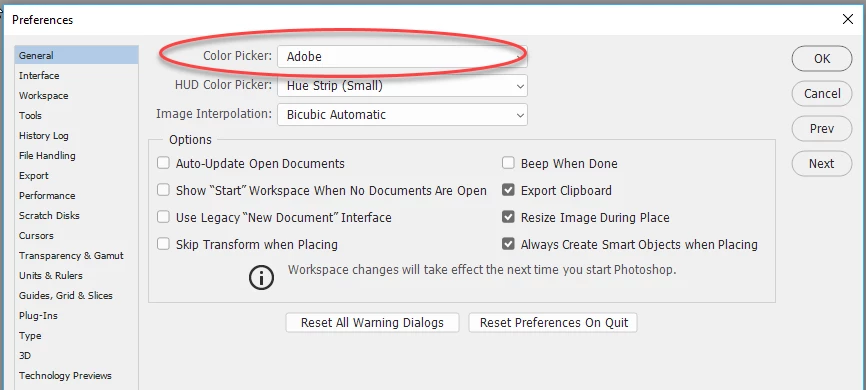
    Go to Edit >Preferences >General >Color Picker and choose Adobe

    Dave

    2 replies

    gener7
    Community Expert
    Community Expert
    February 14, 2018

    I think it's a Preferences setting where you can choose either rhe Adobe Color Picker or the Microsft Color Picker.

    Ctrl k to get to Preferences, General and at the top is a drop down menu for the default Color Picker. Select Adobe's Color Picker > OK and try again.

    Apple's Color Picker is fun...you have the option  for Color Pencils.

    davescm
    Community Expert
    davescmCommunity ExpertCorrect answer
    Community Expert
    February 14, 2018

    Hi

    Go to Edit >Preferences >General >Color Picker and choose Adobe

    Dave