Participating Frequently
October 7, 2024
Question

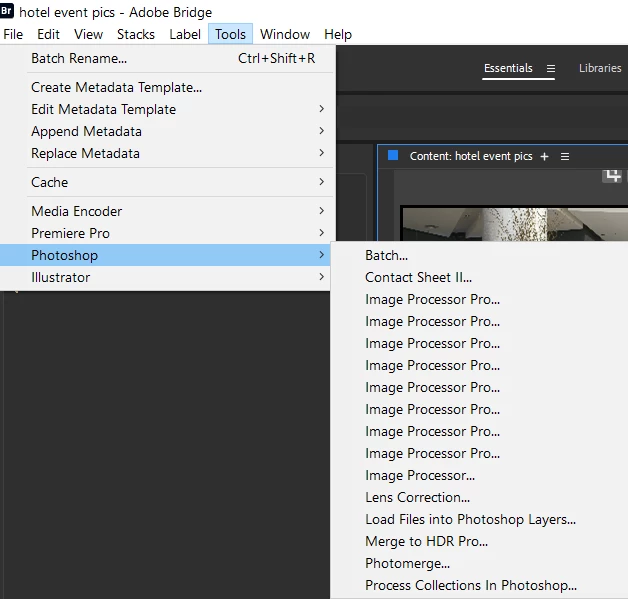
Multiplying gremlin behaviour - Image Processor Pro script in Bridge

  • October 7, 2024
  • 1 reply
  • 198 views

So after 6 hours of troubleshooting which involved updating Bridge, then rolling it right back to 13.0.9, this then disappeared the Image Processor Pro script. Found out that I'd either have to reinstall PS or go to the matching 2024 version of Bridge. So now back to Bridge 14.1.2.


However, now, instead of IPP not showing, it's MULTIPLYING! Like gremlins, everytime I visit the menu, there's more of them!

Apart from my mild OCD this affects, just worried it's doing unnecessary work in the background on an already sluggish PC.
This topic has been closed for replies.

1 reply

Stephen Marsh
Community Expert
Community Expert
October 7, 2024

Startup scripts could be loaded into the Bridge app multiple times and this could possibly have some minor impact, however, I doubt that it would be major. A script is only running when executed though and then finishes on completion. Double check the installation instructions.

Participating Frequently
October 7, 2024

I've certainly gone through the IPP install instructions many times, both during normal update procedures and this time around with all this cuffufle (however you spell that!). So unless there's something in particular someone can point me in the direction of to check, I'd say all seems to the T.

Maybe in the end it doesn't matter so much, but it's a little concerning having more than a dozen occurrences of it in the menu.