

Alessandro Vecchi
Inspiring
November 17, 2020
Answered

My Action is not Working

  • November 17, 2020
  • 2 replies
  • 1289 views

Hello,

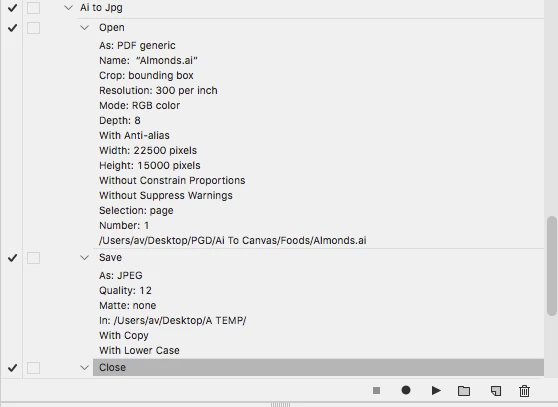
I've just created an action to open a batch of .ai files and save as 300dpi jpg.

While creating the action all when smootly.

When I run the action all document are opened but nor the command save or close without saving are running.

I end up with all files opened in photoshop.

Can someone help me understand why since it's a simple action and the opened file has just 1 layer?

Thank you
This topic has been closed for replies.
Correct answer c.pfaffenbichler

Thank you so much for your guidance.

I'm not a tech guy so for me is all kind of alien language.

I'll try to find the scrip among the ones you sent me.

PS: I tried to edit my previous answer. I know that I wrote "where" instead of "were" 🙂


I hope you get Image Processor Pro to work, a custom Script would probably be a bit of work. 


I tried using Tools > Photoshop > Image Processor, but the resulting jpgs were distorted. 

2 replies

Stephen Marsh
Community Expert
Community Expert
November 18, 2020

You could also try PDF Processor II:


https://raw.githubusercontent.com/Paul-Riggott/PS-Scripts/master/PDF%20ProcessorII.jsx


Instructions for saving and installing or running the script here:


https://prepression.blogspot.com/2017/11/downloading-and-installing-adobe-scripts.html


Good luck!


Alessandro Vecchi
Inspiring
November 18, 2020

Thank you for sharing your thoughts!

I found a solution!

Have a great day!!

c.pfaffenbichler
Community Expert
Community Expert
November 17, 2020

The Action opens one specific file


What are the Batch-settings? 

Why don’t you create the jpgs from Illustrator? 

Alessandro Vecchi
Inspiring
November 17, 2020

Thank you for your reply.

I can't go from Illustrator because the file is too big and my illustrator can't do it.

The settings are the ones of the image attached.

The batch open all files but do not save any of them nor close the files.

Alessandro Vecchi
Inspiring
November 17, 2020

I've also tried to set the Destination to "Save and Close" but it's the same. Nothing happens