
Alizarin
Participating Frequently
January 11, 2022
Question

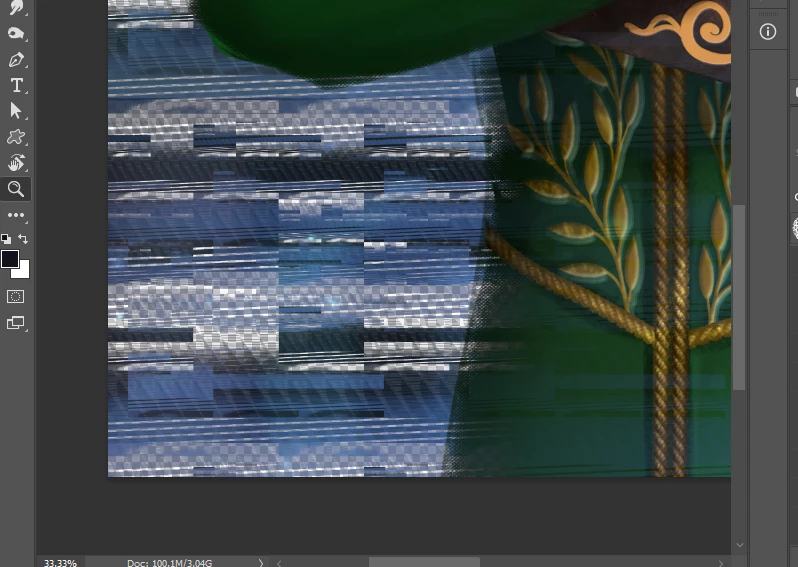
My file has glitched pixels that weren't there before. What could be the cause and is there a fix?

  • January 11, 2022
  • 3 replies
  • 423 views

Project is under an NDA so I'm posting a small crop of the damage, but it extends the whole image... When I opened the file it looked normal in the preview, but opened to this. There's a detailed bookshelf in the background that is destroyed, and the foreground has some destruction as well. The pixels are deleted on every layer. Fortunately I have backups but still lost a few hours of work, and this is probably the 3rd time this has happened in a year (to other files). My deadlines are really tight, and this is frustrating.


What could be causing this? I paint in a large .psb format. (7000px by 4000 px). Is there any way to tell if this is just a photoshop-side issue or failing hardware? I've done hardware tests with various programs and none indicate malfunctioning hardware, but I'm not sure if they're testing my harddrives or just the main components.

CPU:  AMD Ryzen 5 1600 CP, GPU: Nvidia geoforce 1060, RAM: 32 GB. Photoshop is run on an internal harddrive. 
 

    This topic has been closed for replies.

    3 replies

    Alizarin
    AlizarinAuthor
    Participating Frequently
    January 11, 2022

    On a separate note, looking through all the layers it seems that all the ones I worked on last night are untouched, and the damage is on the top and bottom layers that I was not working on. It was bit of a process combining layers from old files and this one, but I saved a few hours work!!!


    Would still like to know what causes this, I'm not always this lucky. 

    davescm
    Community Expert
    Community Expert
    January 11, 2022

    Are you saving to an internal drive or an external drive?

    Dave

    Alizarin
    AlizarinAuthor
    Participating Frequently
    January 11, 2022

    I'm saving to an internal harddrive. It's got 150 GB free. The HD is a Western Digital 1TB SATA 6 Gb/s 7200 RPM 64MB

    Ged_Traynor
    Community Expert
    Community Expert
    January 11, 2022

    Hi

    What version of Photoshop are you using, if it's the most recent try enabling this option in preferences and restarting Photoshop to see if it helps

    Alizarin
    AlizarinAuthor
    Participating Frequently
    January 11, 2022

    I updated Photoshop after seeing the glitch and before posting here. I update photoshop every few months, but I'm not completely sure which version I was using before.


    That option in preferences was not enabled before, but I've gone and enabled it. The pixels are still missing on the file, and I unfortunately don't have a way of testing to see if that helps in the future. Thank you for your help nontheless. 

    Ged_Traynor
    Community Expert
    Community Expert
    January 11, 2022

    Did you restart Photoshop after enabling that option, also is it happening to this file only

    Peru Bob
    Community Expert
    Community Expert
    January 11, 2022

    I've moved this from the Using the Community forum (which is the forum for issues using the forums) to the Photoshop so that proper help can be offered.

    Alizarin
    AlizarinAuthor
    Participating Frequently
    January 11, 2022

    I didn't see the other forum, thank you for doing that!