Answered
My Healing Brush Tool seems to have disappeared after going into 3D mode
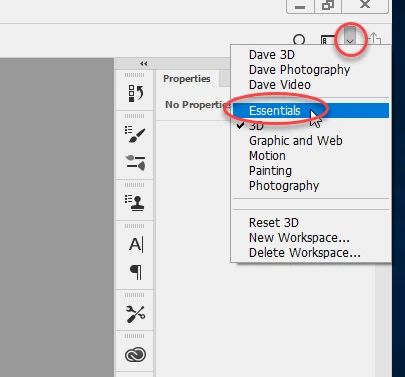
I was creating a graphic, ended up in 3D mode, and where my healing brush used to be, I now have the 3D Material Eyedropper Tool.
I'm done with my graphic, now I want my Healing Brush back. I have closed out the graphic, opened a photo I want to edit, but still don't have the Healing Brush. I have exited and reopened Photoshop, still no Healing Brush.
No doubt, I lack some basic understanding about 3D mode, but.... ?? Help? I'd like my Healing Brush back and I'd also like an explanation so I can solve my own problems in the future.
I am using Photoshop CC 2018 19.1.5.
 AdChoices