Participant
September 9, 2017
Answered

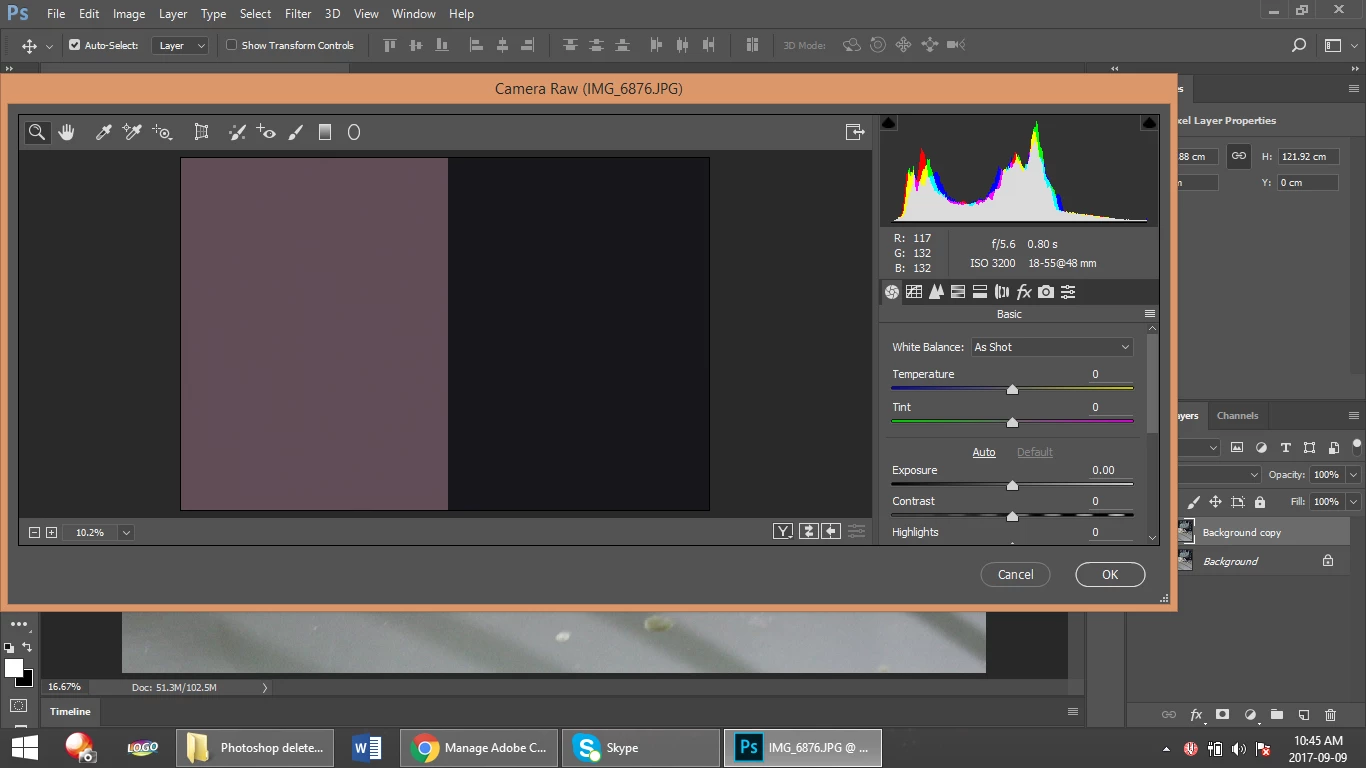
My images shows boxes of solid color when I open them in Camera Raw Filter tab

  • September 9, 2017
  • 2 replies
  • 1659 views

Hi everyone,

I recently updated my Adobe Photoshop as it notified me. After I updated my photoshop any Jpeg or png images when I open In photoshop allows all other edits except for Camera Raw Filter. When I open choose the option to make finer changes to the image in camera raw it shows me boxes of solid color. This never happened before and I don't know what to do about it.

Does anyone know what to do about it ?
This topic has been closed for replies.
Correct answer davescm

Hi

Try turning off "Use Graphics Processor" in Preferences - Camera Raw

Dave

2 replies

tmyusuf74
Inspiring
September 12, 2017

It is your pc problem check out your pc performance

davescm
Community Expert
davescmCommunity ExpertCorrect answer
Community Expert
September 9, 2017

Hi

Try turning off "Use Graphics Processor" in Preferences - Camera Raw

Dave

Participant
September 11, 2017

it shows unchecked already. Is there any other way?

gener7
Community Expert
Community Expert
September 11, 2017

You can go into Preferences > Performance and click on the Advanced button inside "Use Graphics Processor". Try setting the Drawing Mode to Normal or Basic.

If you are using Windows, visit your Graphics card maker for updated drivers. Also in the case of dual graphics cards, set your Graphics card control panel from automatic switching to always use the high performance card.

You can also go to Help > System Info and Copy/Paste the entire contents into your reply.