
Participant
August 27, 2024
Answered

My Photoshop windows and menu are flashing

  • August 27, 2024
  • 8 replies
  • 544 views

My Photoshop windows and menus are flashing, and the software is slow and almost impossible to use. The same thing is happening with my Lightroom, which is slow and has flashing menus.


Observations:
- Both software were working normally until a few weeks ago
- In Photoshop, the menus only start flashing when I have a project open. When I close the project, the menus stop flashing and the software goes back to being fast
- I have tried reinstalling both software, but the problem persists
- All video and GPU drivers on my computer are up to date


My computer:
- CPU: Intel i5 4440 3.10GHz Quad-Core
- RAM: 16GB DDR3 (4x4GB)
- GPU: NVidia GTX 970 4GB
- Storage: 1x 1TB HDD and 1x 480GB SSD


I have always run Photoshop and Lightroom smoothly using this computer
This topic has been closed for replies.
Correct answer Ged_Traynor

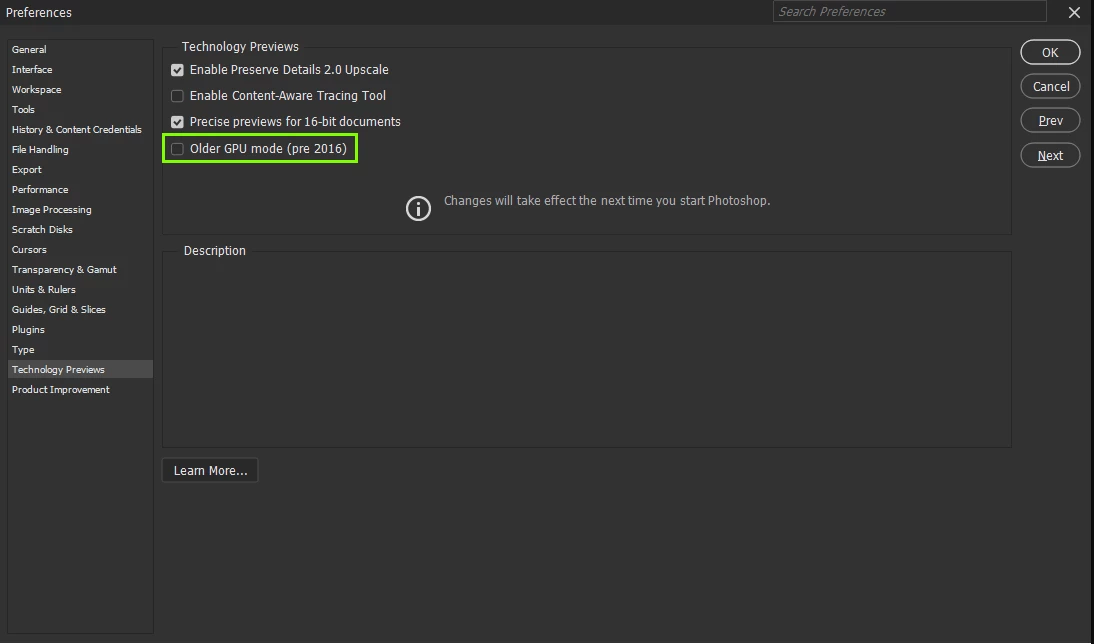
@Lucas_Rosa6699 the Nvidia GTX 970 4GB was released in 2014, try enabling this option in preferences and restarting Photoshop, as for Lightroom, I don't use it so can't advise

8 replies

Participant
August 29, 2024

The problem is that I live in Brazil and everything here is very expensive, an RTX 4050 in the US costs less than 20% of the monthly salary of an average American, while here in Brazil the same GPU costs a 3-month salary of an average Brazilian. But I will consider the possibility of upgrading the GPU.

Participant
August 29, 2024

I understand, I just found it strange because it was working smoother than butter until a few weeks ago and suddenly here I am with everything freezing 😕😕

D Fosse
Community Expert
Community Expert
August 29, 2024

@Lucas_Rosa6699  OK, here's the long answer, and the part of the equation you're missing.


Back in the old days, 2014, the video card was a one-way funnel. The GPU would just get data in, and pass it on through the display pipeline. That was it.


Fast forward to 2024, and the GPU has a dramatically different role. Now, it's a co-processor for Photoshop. The GPU is used for actual data processing, taking a large part of the load off the CPU. Some tasks are now processed exclusively in the GPU, they don't touch the CPU. The output from that processing is sent right back to Photoshop. It goes back and forth.


The GPU still sends data to the display pipeline, but it does so much more. Modern GPUs have dedicated cores to handle AI-based tasks, for instance.


None of this was even on the drawing board in 2014.

D Fosse
Community Expert
Community Expert
August 29, 2024

It was good in 2014, it is not good ten years later. The world has moved on since then.

Participant
August 29, 2024

But my GPU isn't that bad 😕😕, I've always run Photoshop and Lightroom very smoothly, until last year I could run TIFF files in Photoshop with more than 2GB without any crashes, I could have more than 5 projects open at once without any bottlenecks, I run most current games in Medium quality in Full-HD at 60fps, I believe it's some incompatibility or conflict problem that's happening between my GPU and Adobe softwares. It's just old but it's a good board 😔

Bojan Živković11378569
Community Expert
Community Expert
August 29, 2024

Replace your GPU if you can afford it, otherwise, nothing else will make a significant difference, in my opinion. Things are likely to get worse with upcoming releases.

Participant
August 28, 2024

I tried enabling the setting, the menus and windows stopped flashing but Photoshop became even slower.

Ged_Traynor
Community Expert
Ged_TraynorCommunity ExpertCorrect answer
Community Expert
August 28, 2024

@Lucas_Rosa6699 the Nvidia GTX 970 4GB was released in 2014, try enabling this option in preferences and restarting Photoshop, as for Lightroom, I don't use it so can't advise