
Participating Frequently
August 20, 2023
Answered

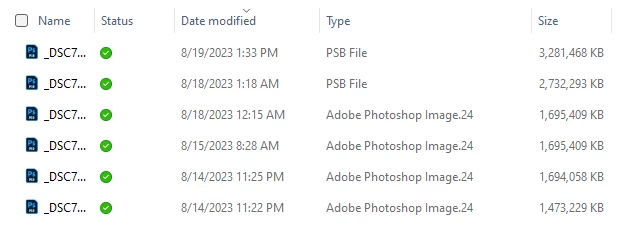
My .psd files are listed as "Adobe Photoshop Image.24" in Windows 11. Is this normal?

  • August 20, 2023
  • 2 replies
  • 8007 views

I noticed that all of my .psd files are listed as "Adobe Photoshop Image.24" under the Type column in Windows Explorer in Windows 11. My .psb files are listed as "PSB File" though. I would think psd files would be listed as "PSD File." Below is a screenshot of a few files in Windows Explorer. I never noticed this before. Should I be concerned? I have tried a few of the .psd files and they open fine, but I'm worried something is wrong for them to be listed that way. If people with Windows 11 (or even 10) can check how they're .psd files are listed under the Type column (which is in the details view in Windows Explorer), I would really appreciate.
 

This topic has been closed for replies.
Correct answer D Fosse

This is normal, nothing wrong.


I suppose it's because PSD is Photoshop's native file format. Never really thought about it. 24 is because that's the version holding the Windows file assiociations.


I notice the same for other applications' default file formats: "Adobe Illustrator Artwork 27", "Microsoft Word Document", etc.

2 replies

Participant
June 16, 2024

i have this problem ! but my file opens as an image and i saved it as a psd, i'm concerned because now i can't keep editing what i had, this has never happened before, help


D Fosse
Community Expert
Community Expert
June 16, 2024

This probably happened because you unistalled an older version with a new version still in place. The old version took file associations with it on the way out.


Quick fix: Right-click and "open with". Click Photoshop and "always use this application".


Proper fix: Go to Windows Settings > "Choose default application by file type". Here you can go over all file types and set them one by one.


If this doesn't work for whatever reason, uninstall and reinstall. Depending, this might even be the simplest solution.

D Fosse
Community Expert
D FosseCommunity ExpertCorrect answer
Community Expert
August 20, 2023

This is normal, nothing wrong.


I suppose it's because PSD is Photoshop's native file format. Never really thought about it. 24 is because that's the version holding the Windows file assiociations.


I notice the same for other applications' default file formats: "Adobe Illustrator Artwork 27", "Microsoft Word Document", etc.

Participating Frequently
August 22, 2023

Thanks for the reply. I guess I just never noticed one way or another. I found some images online of Windows Explorer with psd files and, as you said, they looked the same. I'm glad it's nothing to be concerned about.