My 'Save', 'Save As' Debacle.
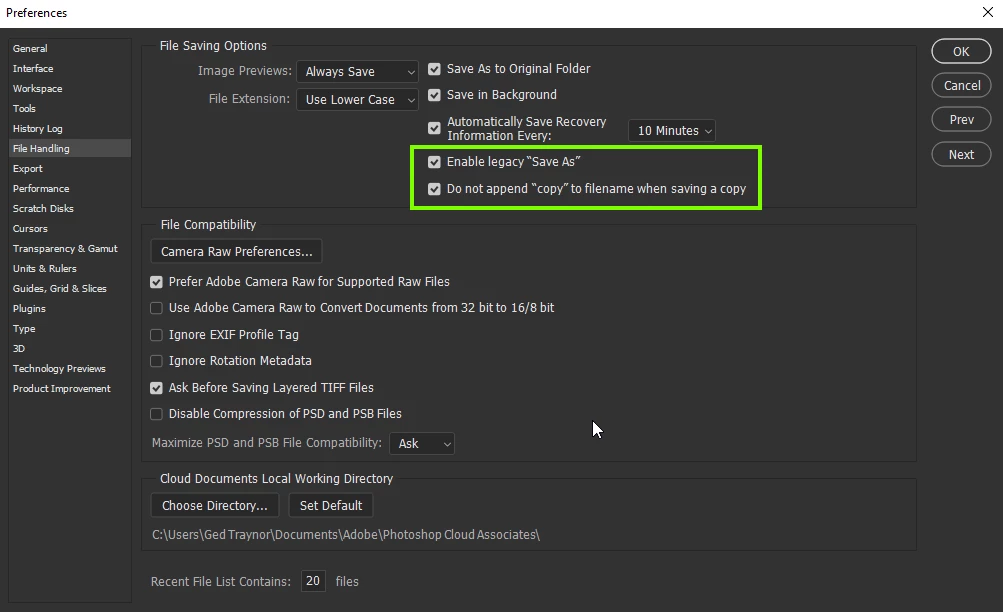
wondering if any one else is experiencing this in v. 2021.
always in the past if i opened a file directly from an email (pc, Chrome, Gmail)
worked on it and then chose 'Save' or 'Save As', the file would then reflect that the file now is the file and the location where you just saved.
Example:
original file opened: tempo1.psd in Downloads/Temp folder
then 'save' or 'save as' newversion.psd in Customer folder.
before, the file tab would reflect it is now the file that you saved it as.
But now, the file will still show it is the temp1.psd in the Downloads/Temp folder.
Is it a settings change i have missed?
so, as a result, this is what is happening:
i open the file, work on it, save as a different name in a new location, but then when i close the file it then asks if i want to save the changes to the original temp file. I choose no, because i have saved it to the other file name and folder. But when i open that file from the new folder, no changes have been saved!!! i have to start all over!!
So my workaround is that i have to open the file, save it where it is, save as to a new folder, close it, then open the new file in the new folder, THEN begin work.
i have never in my 26 years of PS have this issue.
 AdChoices