
Inspiring
June 11, 2019
Answered

My trailing source point has vanished

  • June 11, 2019
  • 2 replies
  • 443 views

Newbie Question:

When using the clone stamp tool and the healing brush, after "taking" a source point (Alt + Click), a little cross representing the source point follows the brush as you apply the tool.

Suddenly, my source point is no longer visible.  Could I have accidentally disabled it?
    This topic has been closed for replies.
    Correct answer Chuck Uebele

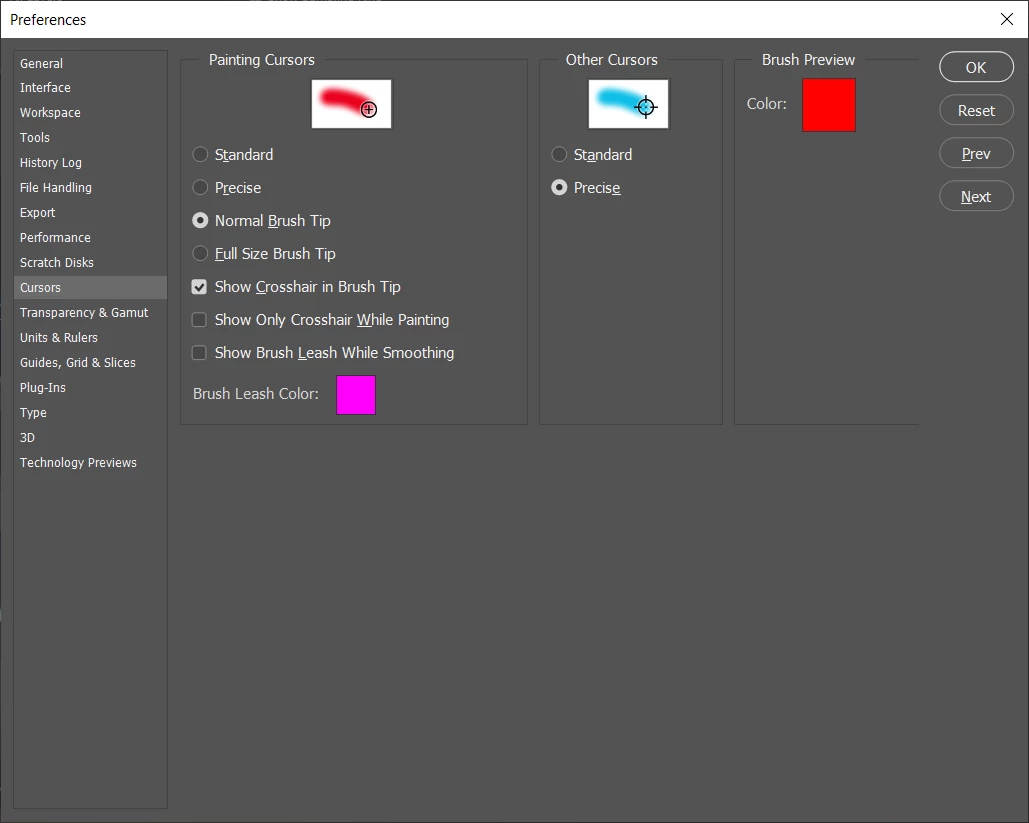
    The cross hair appears if you have the cap locks on. Or you might have turned it off in the preferences.

    2 replies

    Stephen Marsh
    Community Expert
    Community Expert
    June 11, 2019

    The samle point "cross" should only be visible when the mouse button is down and you are cloning. Try setting a new sample point. You may need to reset the tool, or as a last resort reset preferences if you can't get the tool behave.

    Chuck Uebele
    Community Expert
    Chuck UebeleCommunity ExpertCorrect answer
    Community Expert
    June 11, 2019

    The cross hair appears if you have the cap locks on. Or you might have turned it off in the preferences.

    BH888Author
    Inspiring
    June 11, 2019

    After closing PS, I reopened it the following day, and to my surprise, the "sampling cross" had become visible again.

    Since I did not go into preferences in the interim, I suspect that, as you suggested, I had inadvertently put the caps lock on; - and then back off, before opening PS again the following day.

    Thank you for your help again.