
Mageling
Participating Frequently
June 9, 2021
Question

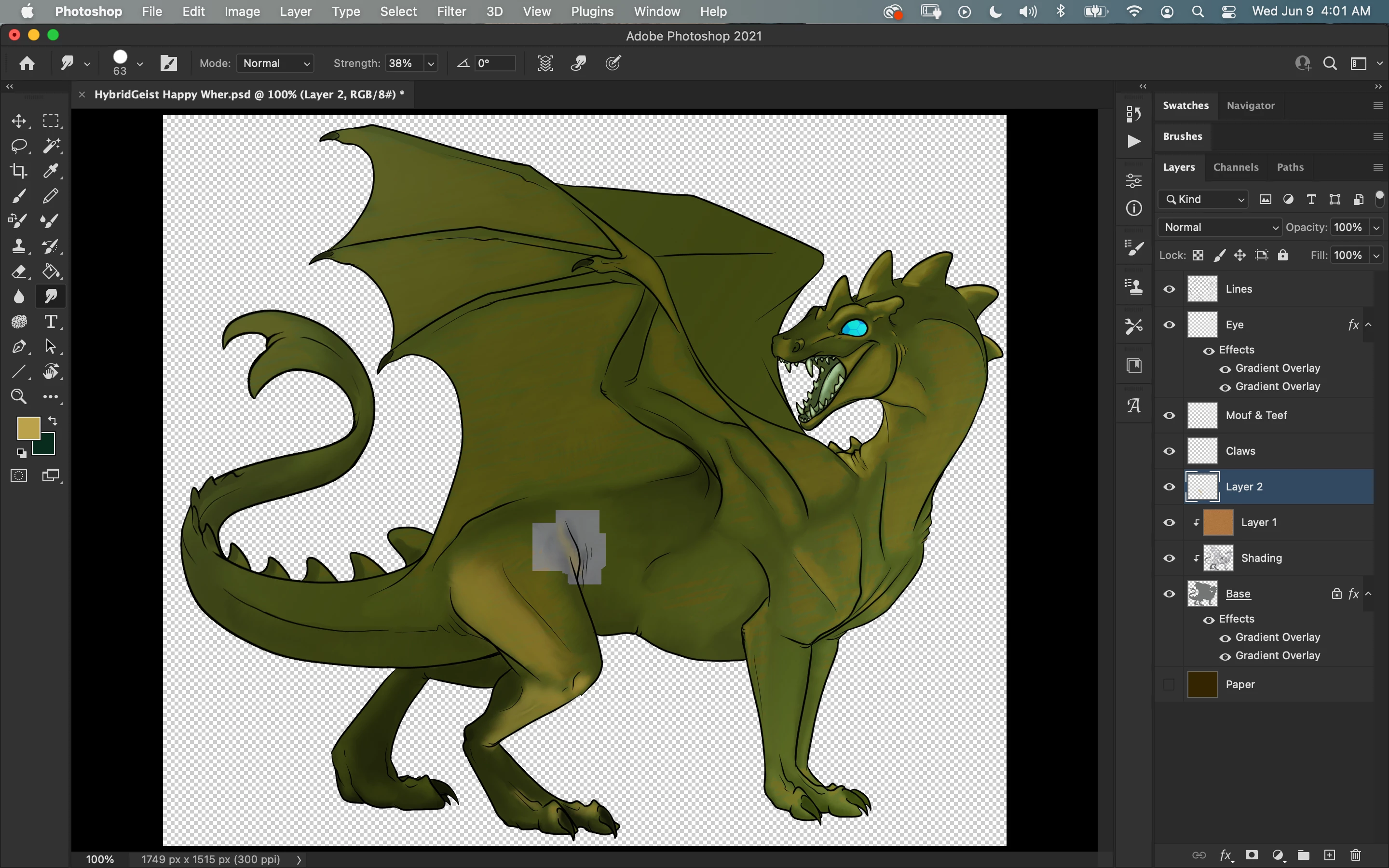
Mystery Greying in Photoshop on Mac M1?

  • June 9, 2021
  • 1 reply
  • 1455 views


Any idea why photoshop is greying things out in blocks like this when I use brushes and smudge brush? Help. :c


This topic has been closed for replies.

1 reply

c.pfaffenbichler
Community Expert
Community Expert
June 9, 2021

GPU issues maybe … 

Does turning off »Use Graphics Processor« in the Performance Preferences (Photoshop > Preferences > Performance > Graphic Processor Settings) and restarting Photoshop have any bearing on the issue? 

Does turning on »Deactivate Native Canvas« (Photoshop > Preferences > Technology Previews) and restarting Photoshop have any bearing on the issue? 

Mageling
MagelingAuthor
Participating Frequently
June 9, 2021

So far, nothing I've done following the above has produced any different results. :c

c.pfaffenbichler
Community Expert
Community Expert
June 9, 2021

Just to make sure: Are the blocks are a display issue or are they permanently present in the file?