Participant
October 3, 2020
Question

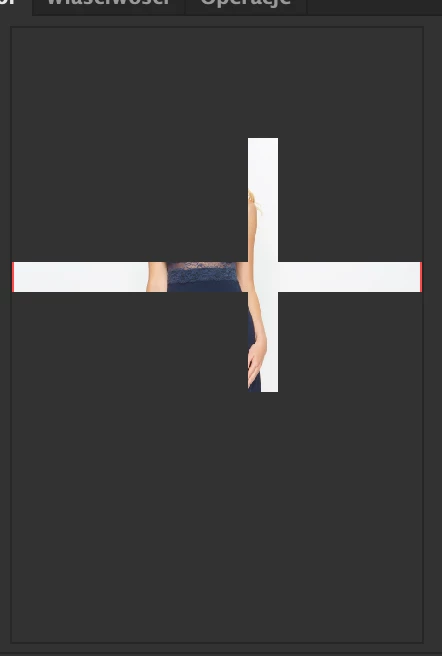
navigator panel bug

  • October 3, 2020
  • 5 replies
  • 941 views
when I go out and go back to photoshop I see a navigation panel like this. please help

This topic has been closed for replies.

5 replies

__RLY__Author
Participant
October 4, 2020
 
Unfortunately all the instructions did not help.
I will add that when I minimize photoshop and come back there is no problem.
The bug occurs when I switch programs in the dock. The problem has been occurring since several updates.
gener7
Community Expert
Community Expert
October 4, 2020

If you are running MacOS 10.14 or 10.15, you may have to give Photoshop trusted privileges due to increased security in this OS. Just click the + to add Photoshop to the list. You may also want to click on

"Full Disk Access" and be sure Photoshop is added there as well. Restart your Mac.


If this doesn't help, you should get a chat going with Customer Care.


https://helpx.adobe.com/contact/help.html?step=PPRO_how-tos-troubleshooting_troubleshoot_stillNeedHelp


gener7
Community Expert
Community Expert
October 3, 2020

Was this problem always there or did it recently happen? Did you upgrade Ps or MacOS recently?

Meantime I can suggest dropping the Drawing Mode to basic and unchecking OpenCL in your Graphics Card Advanced Settings to see if it takes the stress off your card. (See screenshot) and check your Cache levels. 2 or better, but I choose 4.

Also go into Help > System Info, Copy and Paste your specs into your reply. No promises, but we may spot something.

__RLY__Author
Participant
October 3, 2020
the problem still exists. in my opinion this is the problem of refreshing the navigator panel when I go back to photoshop.

gener7
Community Expert
Community Expert
October 3, 2020

Two ideas: Check on "Legacy Compositing"

If you have a dual card system, uncheck "Automatic Graphics Switching"


c.pfaffenbichler
Community Expert
Community Expert
October 3, 2020

Does turning off »Use Graphics Processor« in the Performance Preferences (Photoshop > Preferences > Performance > Graphic Processor Settings) and restarting Photoshop have any bearing on the issue? 

__RLY__Author
Participant
October 3, 2020
 
when the graphics processor is off, the navigation panel is working fine, but the work area looks like this ;/