Brandi Leath
Participating Frequently
July 20, 2015
Answered

Need a script to resize landscape and Portrait images without having to sort first

  • July 20, 2015
  • 1 reply
  • 801 views

Ok I downloaded this awesome script: Image Processor Pro to create multiple batches in one swoop.

http://blogs.adobe.com/jkost/2015/06/image-processor-pro-for-photoshop-cc-2015.html

This is awesome, but I still have to run an additional droplet to resize those files to exactly 374x498 and 276x385, after I trim them it will make it "fit" but it's not exact.

Here's my process:

I have original TIFF images that I have edited, original is usually square. (sometimes they are not, and I would like to have a solution for this as well, but one thing at a time)

From those TIFF's I run the script to save into 4 different folders:

Resize to 2000x2000 and rename to add sizing to the filename

Resize to 500x500 and rename to add sizing to the filename

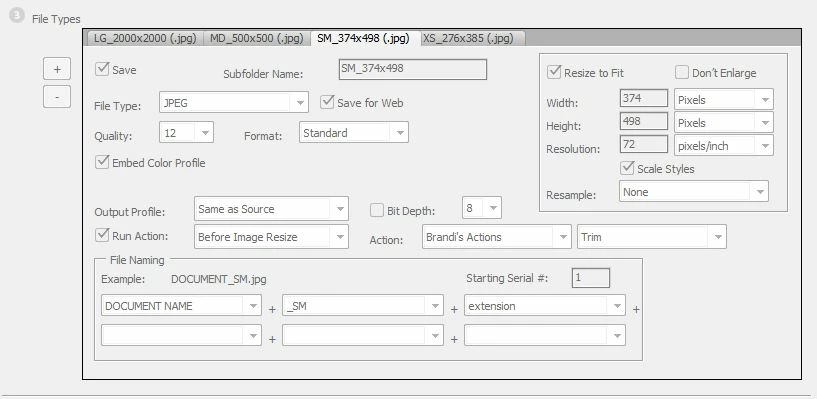
Trim & Resize to 374x498 and rename to add sizing to the filename

Trim & Resize to 276x385 and rename to add sizing to the filename

Here's what it looks like:

Here is what it looks like after I run my image processor:
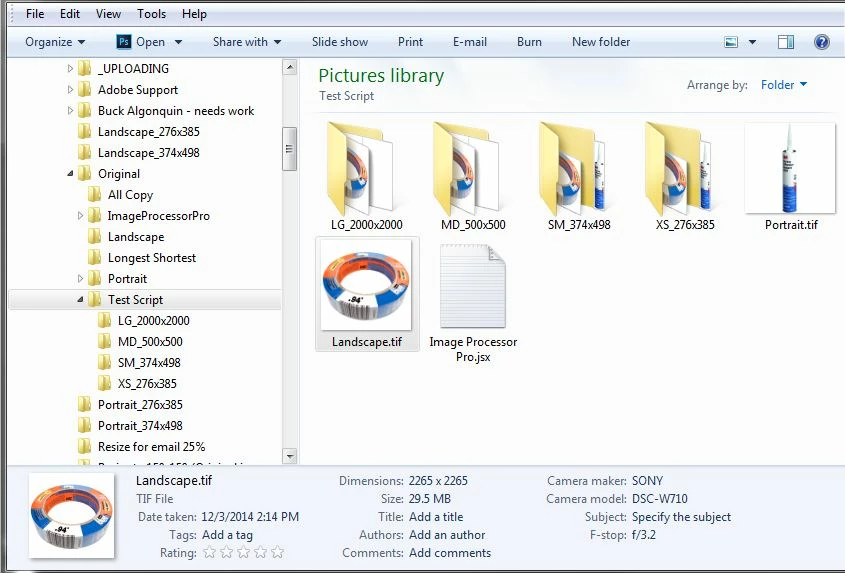
and here is an example of the files in the XS folder with dimensions:

Which is great! But now I have to go in and sort my SM and XS images by Landscape & Portrait and THEN run another droplet on them to get them to fit exactly 374x498 and 276x385.

SOOOOOOO please tell me there is a better way! I'm almost there!

This topic has been closed for replies.
Correct answer JJMack

If the version of Photoshop supports condition sctions and  the condition is one conditional action support you can get by without learing scripting. The problem the actions need to be in the same action set and the set can not be renamed.  Here the action need to be used after Image processor  pro does the fit image resize then tho conditional actions can add the canvas to make the document the exact size.

1 reply

Inspiring
July 20, 2015

Assuming that you have one action for landscape and another for portrait, create another action and add an Insert Conditional...  step and add your two actions in there where appropriate. Then put this new action into Run Action on the appropriate IPP tab.

Edit for clarity.

Chuck Uebele
Community Expert
Community Expert
July 21, 2015

That's one of the main reasons I got into scripting: separating out vertical & horizontal images - back when there wasn't conditional actions.

JJMack
Community Expert
JJMackCommunity ExpertCorrect answer
Community Expert
July 21, 2015

If the version of Photoshop supports condition sctions and  the condition is one conditional action support you can get by without learing scripting. The problem the actions need to be in the same action set and the set can not be renamed.  Here the action need to be used after Image processor  pro does the fit image resize then tho conditional actions can add the canvas to make the document the exact size.

JJMack