
Brandon2001
Participant
December 4, 2018
Answered

Need Help Fixing Photoshop

  • December 4, 2018
  • 4 replies
  • 626 views

I'm not entirely sure what the issues is with my photoshop and was wandering if anyone could help. I'm using photoshop on my Surface Pro 4 and have had no issues with photoshop before. Basically I loaded up photoshop and was presented with this -

The photoshop symbol also has no icon in the bar at the bottom of the screen. Please if anyone knows what the issue is or a way to fix it, I will really appreciate the help.
    This topic has been closed for replies.
    Correct answer

    Hi

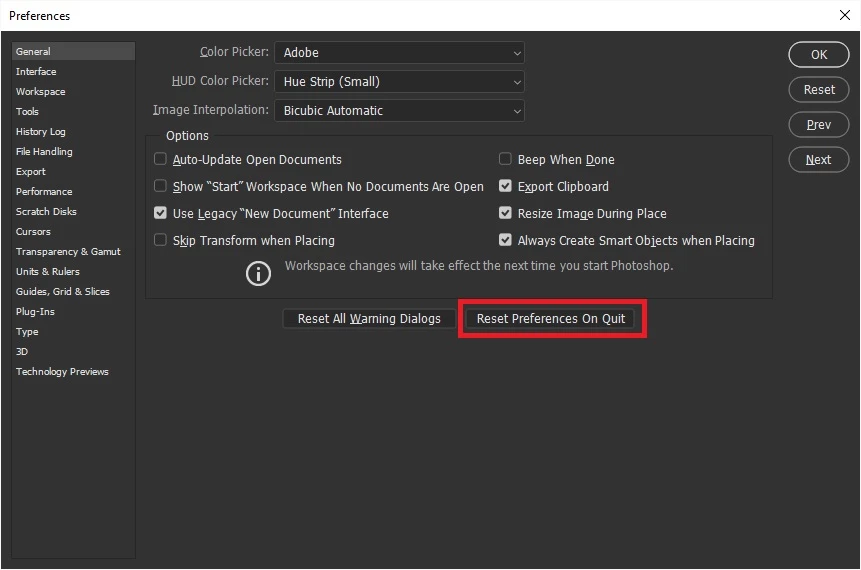
    Can you get into preferences using CTRL + K if so try resetting Photoshop preferences

    If not navigate to this location

    C:\Users\yourname\AppData\Roaming\Adobe\Adobe Photoshop CC 2019\Adobe Photoshop CC 2019 Settings

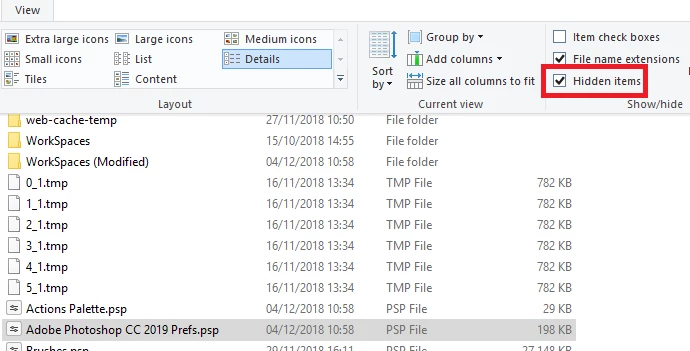
    and delete the Adobe Photoshop CC 2019 Prefs.psp file

    You may need to enable this option in file explorer

    4 replies

    Brandon2001
    Participant
    December 4, 2018

    I don't have the Adobe Photoshop CC 2019 Folder. What do I do now ?

    c.pfaffenbichler
    Community Expert
    Community Expert
    December 4, 2018

    Please post a meaningful screenshot to illustrate what file path you are referring to.

    Brandon2001
    Participant
    December 4, 2018

    War Unicorn
    Community Expert
    Community Expert
    December 4, 2018

    Video redraw issue? Did you try updating the Surface Pro's drivers? They released a batch last week (be aware: It's a big package):

    Download Surface Pro 4 Drivers and Firmware from Official Microsoft Download Center

    c.pfaffenbichler
    Community Expert
    Community Expert
    December 4, 2018

    Does turning off »Use Graphics Processor« in the Performance Preferences (Photoshop > Preferences > Performance > Graphic Processor Settings) and restarting Photoshop have any bearing on the issue?

    Correct answer
    December 4, 2018

    Hi

    Can you get into preferences using CTRL + K if so try resetting Photoshop preferences

    If not navigate to this location

    C:\Users\yourname\AppData\Roaming\Adobe\Adobe Photoshop CC 2019\Adobe Photoshop CC 2019 Settings

    and delete the Adobe Photoshop CC 2019 Prefs.psp file

    You may need to enable this option in file explorer