

Need help understanding blend modes
In his book The Hidden Power of Blend Modes, Scott Valentine describes the color blend mode (p. 174): “Creates a result color with the luminance of the base color and the hue and saturation of the blend color. This preserves the gray levels in the image…”
Simple enough. But I tried the following experiment to test my understanding. (For the images represented below, Opacity and Fill are at 100% in all cases.)
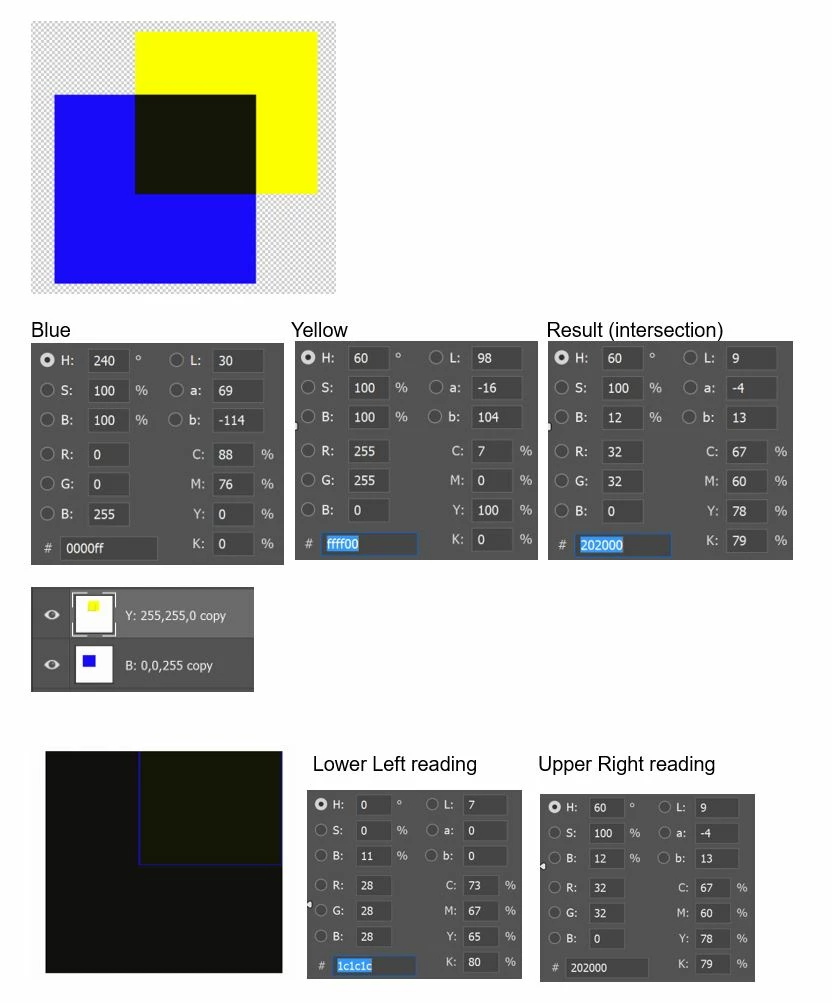
A pure yellow figure is placed on a transparent layer above a pure blue figure, also on a transparent layer. Then, the blend mode of the yellow layer (the “blend layer”) is changed from normal to color. The intersection of the two layers shows the result.
As expected, the resulting color (intersection) maintains “the hue (60) and saturation (100) of the blend color.” However, it does not maintain “the luminance of the base color.” Whether we use Brightness or Lightness (Lab) as a measure, luminance is drastically reduced.
The next two screenshots show the same operation performed using a white rather than a transparent background.
I would have expected the part of the yellow square which does not intersect to have a hue (60) and saturation (100) to match the original yellow figure on the blend layer but with a luminance to match the white background on the base layer (i.e., virtually the same luminance as the original yellow). Instead, the non-intersecting part of the yellow square disappears.
If anyone can explain this, I'd like to understand what's going on. Thanks.
 AdChoices