
Inspiring
September 25, 2022
Answered

Need Photoshop Extension for MacBook Pro

  • September 25, 2022
  • 1 reply
  • 663 views

I got a new Macbook Pro and loaded Photoshop and Lightroom from the Creative Cloud app. The programs do not show inside the Photos app for me to edit my photos with. Apple says I have to download the extentions for those for those apps to have access to my photos from within their Photos App. I used my Creative Cloud App to look in the Market Place like the Adobe Support site suggested, but all I can find there are Plugins to download, not extentions for LightRoom and Photoshop. Where can I find the exttions for my subscription apps???


Appreciate any help,


Jim Hodder
This topic has been closed for replies.
Correct answer gener7

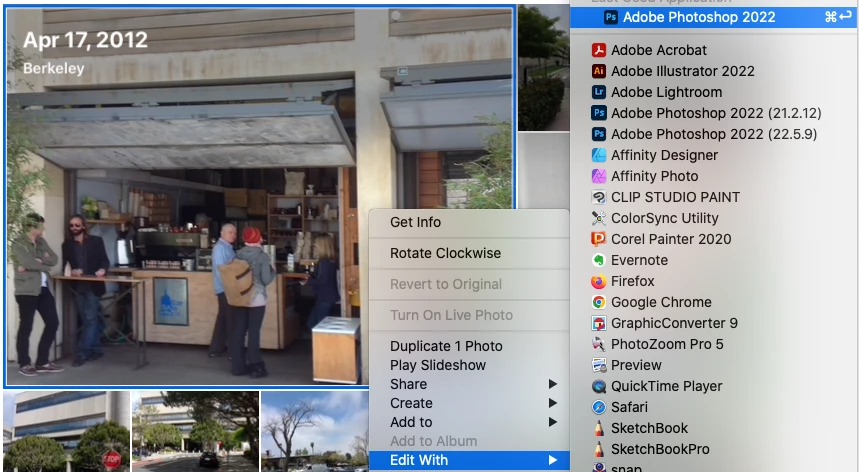
I hope I understand what you want. Photos no longer needs any extensions to open your full-size images in the editor you want. Just right or control-click within the photo and select the editor from the context menu. Command or Shift-click to open multiple images.

1 reply

gener7
Community Expert
gener7Community ExpertCorrect answer
Community Expert
September 25, 2022

I hope I understand what you want. Photos no longer needs any extensions to open your full-size images in the editor you want. Just right or control-click within the photo and select the editor from the context menu. Command or Shift-click to open multiple images.

Inspiring
September 26, 2022

Thanks very much. That works. I really appreciate the help.