
Participant
April 5, 2023
Answered

Needing to write a script to change my current Keyboard Shortcut "Set"

  • April 5, 2023
  • 1 reply
  • 360 views

I've been attempting (with no success) to create a script that will change the current "Set" I have for my keyboard shortcuts. 
Anyone out there have any insight on this or have done this successfully?
This topic has been closed for replies.
Correct answer Kevin Stohlmeyer

Hi @treym19071137 this may be a simpler method to use assign a keyboard shortcut to a saved Workspace.

Workspaces can save keyboard shortcuts, so it's a way to quick switch the sets.

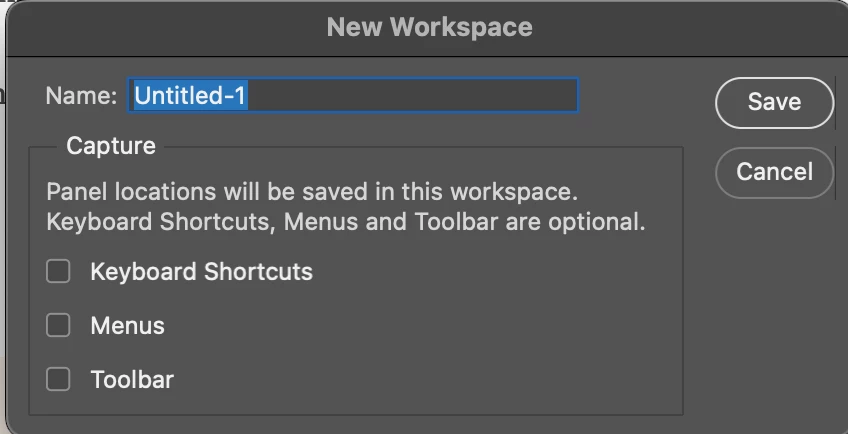
Save a workspace with the shortcut option set:

Then assign a keyboard shortcut to the workspace:

Make sure you go back and save the workspace again (with keyboard shortcuts) to include your new workspace shortcut.


1 reply

Kevin Stohlmeyer
Community Expert
Kevin StohlmeyerCommunity ExpertCorrect answer
Community Expert
April 5, 2023

Hi @treym19071137 this may be a simpler method to use assign a keyboard shortcut to a saved Workspace.

Workspaces can save keyboard shortcuts, so it's a way to quick switch the sets.

Save a workspace with the shortcut option set:

Then assign a keyboard shortcut to the workspace:

Make sure you go back and save the workspace again (with keyboard shortcuts) to include your new workspace shortcut.


Participant
April 5, 2023

Thank you I will give this a shot!
