
Inspiring
April 5, 2022
Answered

nested adjustment layer
  • April 5, 2022
  • 2 replies
  • 1052 views

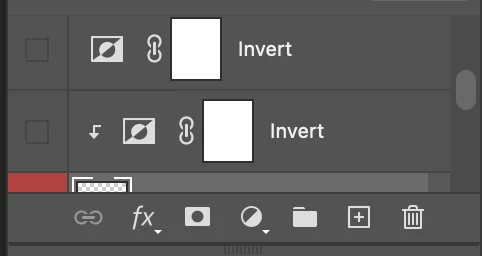
I was examining an example file and found this. Is this an adjustment layer applied on an adjustment layer? What is this and how do I make it? I tried to apply another invert to the nested invert, but that did not work.

This topic has been closed for replies.
Correct answer AuroraPenticton

The lower adjustment layer in your screen shot is clipped to the layer below it, so it will only apply to that layer. You get it to do that by option-clicking (Mac) on the line between the 2 layers. Other than that, the adjustment layers are just stacked.

2 replies

AuroraPenticton
AuroraPentictonCorrect answer
Inspiring
April 5, 2022

The lower adjustment layer in your screen shot is clipped to the layer below it, so it will only apply to that layer. You get it to do that by option-clicking (Mac) on the line between the 2 layers. Other than that, the adjustment layers are just stacked.

jane-e
Community Expert
Community Expert
April 9, 2022


The SO layer called "Main" is white and has been inverted so it is black (65%). There are other layers that you are not showing us that might be affecting your image. Can you resize the layers panel taller or at least scroll up and post a new screen shot so we can see the layers above the two Invert layers?


Jane

WOIEJOAuthor
Inspiring
April 10, 2022

There are a bunch of stuff, but I turned them all off so they are not affecting the image in the screenshot.


I think I figured it out. Among the layer styles applied to the main object, there are three gradient overlays, and one of them is a pretty strong. I tried toggling it on and off, and it is what basically, maybe by coincidence, perfectly nullifies the clipped invert.

invert on


invert off


only when this gradient overlay is turned off does the invert become visible.


Thank you guys for your time, I really appreciate it!

Semaphoric
Community Expert
Community Expert
April 5, 2022

Could you post a screenshot of the Layers panel, including the layer below the two Invert layers?.Adjustment Layers are not nested but are stacked. In your example, the lower Invert layer is in a Clipping Group with the layer below., and only affects the non-transparent parts of the lower layer.

WOIEJOAuthor
Inspiring
April 9, 2022

 Here is the layer to which the clipped invert is being applied. I unclipped the adjustment layer (turned off) because the invert did not seem to be doing anything to the image. The opacity is set at 65%, but even when I restored it to 100, there were no changes observable. This is what it looks like with the clipped adjustment layer:

virtually nothing has changed. Any ideas as to why this was used? Or is it likely it is something that the creator forgot to get rid of?