alpf64358020
Participant
April 28, 2020
Answered

New adjustment layer clips to lower layer by default

  • April 28, 2020
  • 2 replies
  • 547 views

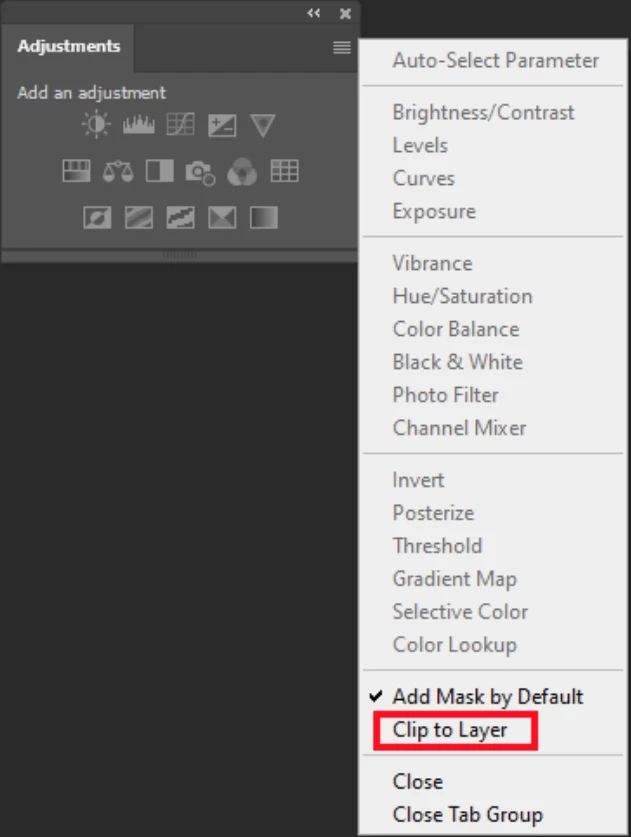
In PS 2020, whenever I hit an adjustment layer clipping is on by default. I have to unclip it when I don't need it. Shouldn't it be the other way around? Is there any way to change the default to "no clipping mask"? 
This topic has been closed for replies.
Correct answer JJMack

You may have set the bug option in the Adjustment Panel Fly-out Menu that changes Photoshop's default behavior and that will cause actions to fail. Do not do that your just asking for problems when you do.  It Acts like a bad preferences that actions and  scripts can not even set to the correct default setting. You should leave the two setting alone have layer mask added by default and adjustment not clipped. This bug was added in CS4.... I do not believe resetting preferences will fix your problem. Its not an actual preference it just acts like one most of the time. Adjusrment Layer are not alwaye added the way the Adjustment panel oprion are set.  There are exceptions for both options.


2 replies

JJMack
Community Expert
JJMackCommunity ExpertCorrect answer
Community Expert
April 28, 2020

You may have set the bug option in the Adjustment Panel Fly-out Menu that changes Photoshop's default behavior and that will cause actions to fail. Do not do that your just asking for problems when you do.  It Acts like a bad preferences that actions and  scripts can not even set to the correct default setting. You should leave the two setting alone have layer mask added by default and adjustment not clipped. This bug was added in CS4.... I do not believe resetting preferences will fix your problem. Its not an actual preference it just acts like one most of the time. Adjusrment Layer are not alwaye added the way the Adjustment panel oprion are set.  There are exceptions for both options.


JJMack
alpf64358020
Participant
April 29, 2020

Thank you. I don't remember setting that option in the first place, but now I am all set.

Chuck Uebele
Community Expert
Community Expert
April 28, 2020

Have you tried resetting your preferences?