
June 19, 2018
Answered

New brushes dont work with eraser or blending brush

  • June 19, 2018
  • 4 replies
  • 9549 views

Hi


i am working on a Mac, with a Wacom Intuos Pro tablet and Photoshop CC 2018.

On two of my computers, i have issues with using forms that i downloaded on the Adobe Website :


The new brushes work with the "brush" tool but not with the eraser tool nor the blending brush tool.


Here is how it goes :


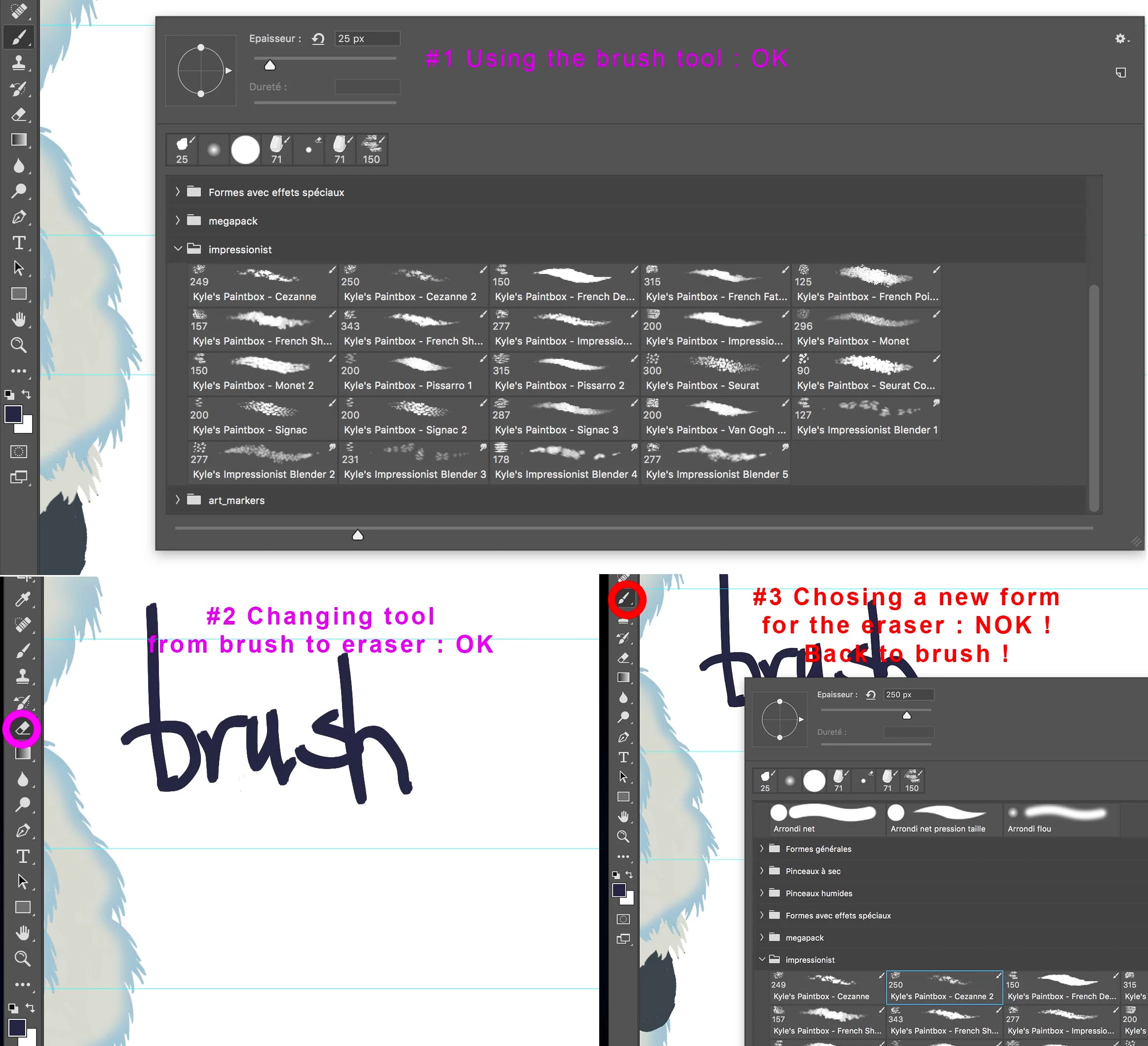
#1 i chose the "brush" tool (B), and right click to pick a brush from the impressionist kit (ex :Seurat Kyle) -> it works

#2 i change tool from brush to Eraser (E)

#3 Right Click ; to chose the same brush form as I used on #1 -> The tool changes from "eraser" back to "brush" and it paints instead of erasing.


The same happens with the blending brush tool. It goes back to regular brush as soon as i chose a new brush form with the right click.
Correct answer davescm

The answer in that previous  post can still be applied, i.e. save a new brush without the tool preset , but since then Photoshop was updated to add the function described by c.pfaffenbichler above - just Ctrl+Alt click (or Cmd+Opt on Mac) to load a brush without changing to its associated tool preset.

Dave

4 replies

September 10, 2021

Hello, 

I have dowloaded several very cool packs of Photoshop brushes but i realize that some brushes can only be used with one tool. For example (picture) some are only meant for the reguler painting brush (little icon on the upper righ corner), some are only for the blending brush etc. 

I read somewhere that there is a simple way to use thes brushes with other tools, but I cannot find the info anymore. 

Can someone help me here ? Thank you in advance !

PS : I use a Mac. 


September 10, 2021

I am sorry I had already asked this in another post, but I could not find the page with all my posts. I have now. I cant seem to delete my question !

June 19, 2018

Thank you for all your answers.

The Cmd+Opt+Click seems to resolve my problem for now, with no need to save any other tool.

I wish you all a nice creative day, and thank you for taking the time to answer to my question.

French Regards

Ma

cinziamarotta
Participating Frequently
June 19, 2018

Hi,

that previous answer by davescm could help you:

Can't make eraser from last brush used

davescm
Community Expert
davescmCommunity ExpertCorrect answer
Community Expert
June 19, 2018

The answer in that previous  post can still be applied, i.e. save a new brush without the tool preset , but since then Photoshop was updated to add the function described by c.pfaffenbichler above - just Ctrl+Alt click (or Cmd+Opt on Mac) to load a brush without changing to its associated tool preset.

Dave

c.pfaffenbichler
Community Expert
Community Expert
June 19, 2018

Brushes can »Include Tool Settings« since a little while back, haven’t you noticed the icons?

To select a Brush but disregard its dedicated Tool and keep the currently selected one cmd-alt click the Brush.