
Participating Frequently
November 16, 2023
Question

New Documents Preset File

  • November 16, 2023
  • 7 replies
  • 315 views

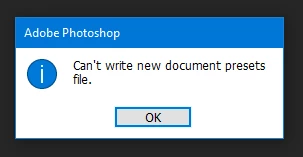
Does anyone know why this is happening, and is there a way to fix it?

For quite some time I have been seeing this warning when closing my PS application. It has continued to persist through several updates. I have uninstalled and re-installed PS to no avail. My hair has turned white dealing with this. Or, it could be that I'm just old.


This is in PS 12.0.1 in WIN10 Pro.

Any help will be greatly appreciated!


This topic has been closed for replies.

7 replies

JudsonRAuthor
Participating Frequently
November 17, 2023

"Running As Admin" first gets me "New File / Unable to Load, the Cloud isn't syncing".

Selecting "Open" shows me one of my image folders with previously-created files. I have no problem opening those.
I then created a New File (from the New Documents dialog) and that opened without being a non-saveable AI document, which is another issue I've been experiencing.

However, when closing, I am still seeing the "Can't write new documents preset file", even after running as Admin.

BTW, these are my PC specs:


Do you know where that file lives?

Kevin Stohlmeyer
Community Expert
Community Expert
November 17, 2023

@JudsonR What happens if you go to the Photoshop.exe application shift+right-click and choose run as administrator. Do you get the same error?

JudsonRAuthor
Participating Frequently
November 17, 2023

Deepest apologies!

I'm using Photoshop 25.1.0! (No idea where the "12" came from.)

Can we start over?

Kevin Stohlmeyer
Community Expert
Community Expert
November 17, 2023

@JudsonR you may be up to date with your OS but that means you've most likely caused the issue. CS5 may work on Windows 10 but there are no guarantees and with continued updating you roll the dice. There is a newer Photographers bundle from Adobe - https://www.adobe.com/creativecloud/photography/compare-plans.html

jane-e
Community Expert
Community Expert
November 17, 2023


quote

@JudsonR wrote: How long ago was CS5?


Photoshop 12.0.1 (CS5) was launched on April 12, 2010.


Jane


JudsonRAuthor
Participating Frequently
November 16, 2023

Kevin,

See my post. I am always up-to-date, having the Adobe Photographers Bundle for several years. How long ago was CS5?!?!?

Kevin Stohlmeyer
Community Expert
Community Expert
November 16, 2023

@JudsonR what Windows OS are you running and are you an admin on the user account?

CS5 is no longer supported and can't be re-installed/activated so if you continued updating your OS its possible you broke compatibility.