Inspiring
June 17, 2017
Answered

New Installation Clone Stamp Anomaly

  • June 17, 2017
  • 1 reply
  • 464 views

Normally within my experience, the clone stamp tool will place the selected source color/pattern, as earlier determined by option-click [Mac] or alt-click [Win], into the target area when the clone-stamp cursor is clicked. What I am finding, after a recent reinstall of PS-CC on a new iMacO/S Sierra 10.12.5, is that the source color/pattern within the clone tool is completely white, and devoid of any texture. It is as if the opt-selection is having no effect.

Have tried resetting all tool presets, to no avail.

Any ideas appreciated.

Best,

jwc

    This topic has been closed for replies.
    Correct answer davescm

    A couple of things to check

    Have you got the options set up to sample from the correct layers ?:

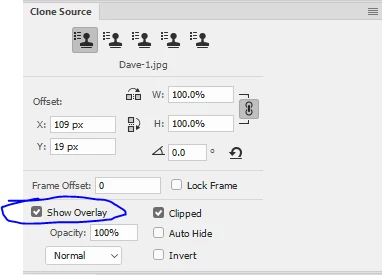
    Is the tool painting correctly but just the preview missing? If so, do you have "Show overlay" checked in the Clone Source panel ?

    Dave

    1 reply

    davescm
    Community Expert
    davescmCommunity ExpertCorrect answer
    Community Expert
    June 17, 2017

    A couple of things to check

    Have you got the options set up to sample from the correct layers ?:

    Is the tool painting correctly but just the preview missing? If so, do you have "Show overlay" checked in the Clone Source panel ?

    Dave

    JackAuthor
    Inspiring
    June 17, 2017

    Perfect; many thanks. When I changed 'Current' to 'Current & Below', behavior returned to what I normally had in prior installations. I also had to select the background layer on which to make the clone-stamp corrections. Without that, there was no 'action' whatever (probably for obvious reasons[!]).

    In answer to your other question,  no; preview was not showing anything; just white (or lack of content).

    davescm
    Community Expert
    Community Expert
    June 17, 2017

    Hi

    Glad it is sorted.

    With sampling set to All Layers or Current and Below you should be able to clone to an empty layer. It is good practice to do that as it does not destroy pixels and can easily be undone later.

    Dave