
Participating Frequently
February 27, 2018
Question

New photoshop Version with small scale - fix?

  • February 27, 2018
  • 6 replies
  • 1331 views

Hallo

I know you have written a lot and got answers to this Problem: I have tried all the described tips found. But it just doesn't work! It is still not possible to scale the user Interface:to 100%. The scale to 200% does however work.
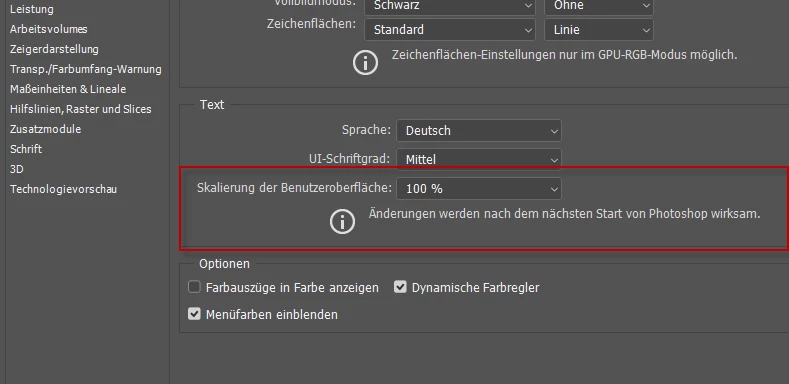
@5827864: Will there be a fix to correct this Problem? I have Windows 8. If not, I won't by CC. If yes - I woud like to install the older Version, where it was possible to scale the Interface to 100%. Is it possible? Please send an answer ASAP. Thank you!

This topic has been closed for replies.

6 replies

Participant
April 12, 2018

Hi,  I have the same issue but it is windows 10. I cant scale my new version to 100%. if my photoshop is in 200% scale it is not pointing the tab which i need to click.

I think Adobe team needs to solve this issue for changing the application into 100% i need to change my whole windows apps to 100 percent which looks very tiny.

I think updated photoshop 100% scale option is not working it is a bug.

Legend
March 20, 2018

Well, I think we'll have static as long as Windows 7 continues to be supported on its current model. But I think the time may come, quickly, when Windows 7 needs to be dropped or become as dynamic as Windows 10. The hacking threats are increasing exponentially, and it's only a matter of time until major expanses of existing software will be locked out in the interests of security. Unfortunately, the need to fix security issues quickly has empowered software developers to change what they like, when they like, without warning. It's also a cultural thing: younger developers expect and relish constant change.

Legend
March 20, 2018

It isn't really a question of whether things run in Windows 10, because it will change. Windows 10 is ABSOLUTELY NOT just the latest in the Windows family, the follow up to Windows 7 and 8. Instead, Microsoft call it "operating system as a service". Microsoft are constantly changing Windows 10, fixing bugs, adding features, changing things, breaking other things. You can't opt out, this is Microsoft's vision of the future. Given this, we can expect to need to be running all apps with subscriptions to keep them working. The old idea of a static mixture of system and apps will cease to exist soon, replaced by an eternal treadmill of updates.

JJMack
Community Expert
Community Expert
March 20, 2018

Old and static mixture with the new will be with up for a long time to come.   Work need to get done.  Work will get done on old hardware and software that works and is mostly static with some additions of newer working and proven processes will be incorporated.  Sanity is the old static stable environment.

IMO we have always been one a treadmill but we were able to control its seed.  However, critical mass is near treadmill controls are failing we now entering an unsafe volatile environment. This new insane unsafe volatile environment is going  to crash and burn at some point.  Then worker bees will then have to put thing back in order while watching the golden parachutes float away.  Poor failling controls = Too Many bugs = eaten alive.

JJMack
Legend
February 27, 2018

Current browser stats show less people are using Windows 8 than are using Windows XP...

JJMack
Community Expert
Community Expert
February 27, 2018

Adobe UI scaling was fixed in CC 2018 version 19.1.1. Using new Windows 10 Features.  Photoshop 19.1.1 uses your Windows 10 display settings.  If you have Windows 8 you can use CC 2017 and use Adobe old  UI scaling where you scale to 100% or 200% there are issues when you scale to 200%.

JJMack
Tuja-2jaAuthor
Participating Frequently
February 27, 2018

If I use CC 2017 I expect that it will be temporarily. I don’t want to pay in future for a version where I can’t benefit the changes. So my question is still important: Will Adobe correct this problem? If not – may I get CC 2017 to a reduced price? We want the annual subscription.

How do I install CC 2017? From where??

Von: JJMack

Gesendet: Dienstag, 27. Februar 2018 14:58

An: Torgaerd Guertler <zum.wisse.segel@intergga.ch>

Betreff: New photoshop Version with small scale - fix?

New photoshop Version with small scale - fix?

created by JJMack <https://forums.adobe.com/people/JJMack> in Photoshop - View the full discussion <https://forums.adobe.com/message/10208140#10208140>

JJMack
Community Expert
Community Expert
February 27, 2018

Tuja-2ja  wrote

If I use CC 2017 I expect that it will be temporarily. I don’t want to pay in future for a version where I can’t benefit the changes. So my question is still important: Will Adobe correct this problem? If not – may I get CC 2017 to a reduced price? We want the annual subscription.

How do I install CC 2017? From where??

If you need to use Microsoft old Windows version 8 and you have very high dpi resolution displays you will need to an older version of Photoshop CC then CC 2018 19.1.1 and a version newer  then CC 2014 if you want to use  Adobe UI scaling.  However there are issues with that Adobe UI scaling You other low resolution displays will also be scaled 2X by Photoshop and Photoshop UI may not fit on some displays scaled 2X.

If instead you want the use Window Scaling where what all Photoshop displays will be scaled. Image as well as Photoshop UI.  You can scale  any percent you want on a per display setting like 125%, 150%, 175% 200%.  You can use any version of Photoshop older than CC 2018 19.1.1.   You will need to modify you Windows 8 registry to support external application manifest files and Add an external manifest file for Photoshop.exe in Photoshop Folder.   If you have an old Perpetual version of Photoshop you can use it.

Windows 8 is preventing you from using the current version of Photoshop if you have very High Resolution displays that need to be scaled.  If you do not have very high resolution Display I woulf thing CC 2018 19.1.1 would work fine one Windows 8

JJMack
AxelMatt
Community Expert
Community Expert
February 27, 2018
My System: Intel i7-8700K - 64GB RAM - NVidia Geforce RTX 3060 - Windows 11 Pro 25H2 -- LR-Classic 15 - Photoshop 27 - Nik Collection 8 - PureRAW 6 - Topaz Photo AI
Tuja-2jaAuthor
Participating Frequently
February 27, 2018

Thank you for your advises. I have already tried all these hints below. Sylvis Blog is outdated. She made a register change – but with the next version it didn’t work anymore. The other tips doesn’t’ suite to Window 8. I don’t have this parameter (see red arrow):

I have tried to choose only “override high UPI scaling behaviour”. But of course that didn’t work.

Your tips do not help! Do you have other advises, that I may use? Thank you!

Von: Axel Matt

Gesendet: Dienstag, 27. Februar 2018 12:57

An: Torgaerd Guertler <zum.wisse.segel@intergga.ch>

Betreff: New photoshop Version with small scale - fix?

New photoshop Version with small scale - fix?

created by Axel Matt <https://forums.adobe.com/people/Axel+Matt> in Photoshop - View the full discussion <https://forums.adobe.com/message/10207941#10207941>