
peterlovelock
Inspiring
November 12, 2021
Answered

New PS update 23.0.1.

  • November 12, 2021
  • 4 replies
  • 660 views

Hi,

I've just updated & unable to find the tool for individual basic editing (not sure what to call it).

I go:

Filter > Camera Raw Filter > Basic ..... then the individual editing tool for exposure & contrast is normally in the narrow right hand margin.

I'm sure it's still there but i can't find it. Any advice please.


Regards,

Peter


You need to ask program questions in the forum for the program you are using
To ask in the forum for your program please start at https://community.adobe.com/
Moving from Using the Community (which is about the forums) to the correct forum... Mod
This topic has been closed for replies.
Correct answer davescm

"..........unable to find the tool for individual basic editing......."


Hi Peter

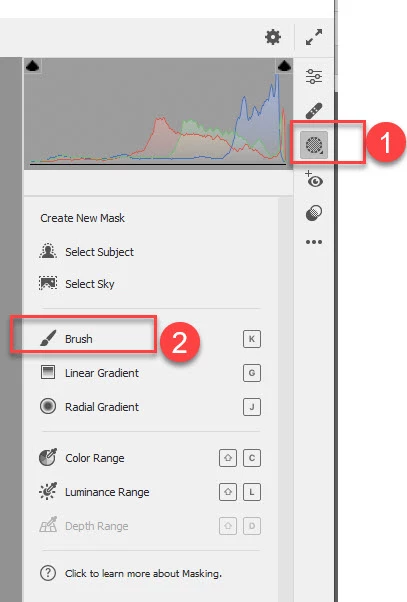
The local adjustment tools are now under "Masking"

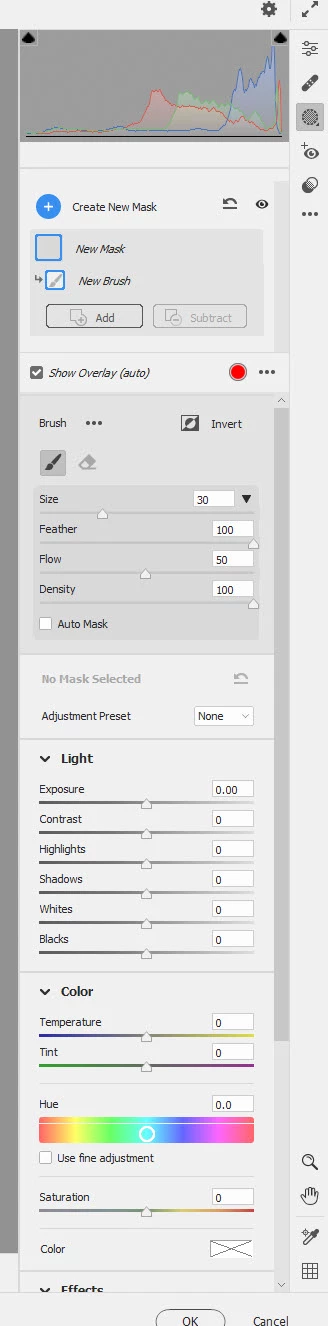
So, for example, to get the local brush - see below :


That will give you the adjustments to go with the brush.


Dave


4 replies

davescm
Community Expert
davescmCommunity ExpertCorrect answer
Community Expert
November 13, 2021

"..........unable to find the tool for individual basic editing......."


Hi Peter

The local adjustment tools are now under "Masking"

So, for example, to get the local brush - see below :


That will give you the adjustments to go with the brush.


Dave


peterlovelock
Inspiring
November 13, 2021

Thank you so much Dave. Much appreciated. It doesn't appear to be so easy to use. Maybe it will be with practise. I might revert to the previous version. Which one would that be?

Thanks again, Peter

peterlovelock
Inspiring
November 13, 2021

Hi ..... sorry to bother you again.

I'm unable to find the forum for Photoshop 23.0.01. Please send me a link or an idiot proof (just about sums me up) step by step guideline. Thank you.

peterlovelock
Inspiring
November 13, 2021

Thank you

Myra Ferguson
Community Expert
Community Expert
November 13, 2021

Exposure should still be in the Camera Raw filter in the Basic section. If the Basic section is closed, click on it to twirl it open. Then Exposure and Contrast should be the 3rd and 4th sliders from the top (just under Temperature and Tint). If you still don't see it, can you post a screenshot?

peterlovelock
Inspiring
November 13, 2021

Hello Myra,

Many thanks for your reply. Unfortunatly it doesn't answer the question i thought i was asking .... my fault. I didn't phrase it correctly or give enough info. Sorry! I'll have another go. Here goes .....


I've just updated & unable to find the tool for individual basic editing for a chosen area (not sure what to call it).

I go:

Filter > Camera Raw Filter > Basic ..... then usually i'm able to go to the individual editing tool icon (which seems to have disappeared) for exposure & contrast etc which is normally in the very narrow right hand margin of the edge of the screen. This tool allows you to apply individual edits to specific area whereas the Basic applies an edit to the whole image.

I'm sure it's still there but i can't find it. Any advice please.