kutiekup23a33228205
Participant
December 12, 2017
Answered

New to Photoshop - animation and onion skin

  • December 12, 2017
  • 4 replies
  • 25180 views

I just got Photoshop and I have no clue how to use it. My passion is Animating and Drawing. I cant find the onion skin mode on the latest version of photoshop.

    This topic has been closed for replies.
    Correct answer davescm

    Hi

    Given the question is on animation, The Onion Skin you refer to is in the Video timeline.

    In the Window menu check timeline.

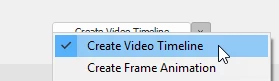
    In the timeline - use the down arrow and click Create Video Timeline
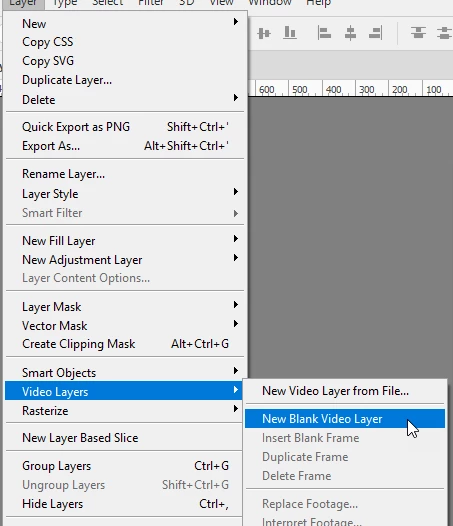
    In the Layers menu - click on Layer > Video Layers > New Blank Video Layer
    Click on the menu at the top right of the timeline and choose enable onion skins

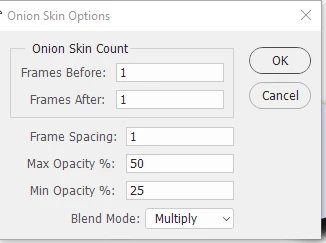
    Onion skin settings options are opened are from the same menu (two items below)
    Dave

    4 replies

    mglush
    Community Expert
    Community Expert
    December 14, 2017

    Also, check out the great tutorials on the Adobe website!

    Photoshop tutorials | Learn how to use Photoshop CC

    Be careful though, Photoshop is addictive!

    Michelle

    KShinabery212
    Community Expert
    Community Expert
    December 13, 2017

    First... WELCOME TO THE PHOTOSHOP FAMILY!

    It is a piece of software that you will continually learn new tricks and ways of doing things.  Even the masters constantly learn new ways to create art with Photoshop.

    Adobe Generation Professional and the Adobe Education Exchange offers FREE courses!

    Also there are some amazing tutorials online.... YouTube.  You can even watch artists live on Twitch and Mixer!

    Then there are magazines like Imagine FX and Computer Arts.  I used to write for Advanced Photoshop Magazine and Photoshop Creative Magazine (but those are dead... can find them on eBay).

    Also do not be afraid to ask people how they create things.  Attend Behance Events/Dribbble MeetUps and meet other artists!

    Nancy OShea
    Community Expert
    Community Expert
    December 12, 2017

    Onion skin is a view mode of the "Select and mask" feature. 

    Learn how to use the dedicated Select And Mask workspace in Photoshop CC.

    Nancy

    Nancy O'Shea— Product User & Community Expert
    davescm
    Community Expert
    davescmCommunity ExpertCorrect answer
    Community Expert
    December 12, 2017

    Hi

    Given the question is on animation, The Onion Skin you refer to is in the Video timeline.

    In the Window menu check timeline.

    In the timeline - use the down arrow and click Create Video Timeline

    In the Layers menu - click on Layer > Video Layers > New Blank Video Layer

    Click on the menu at the top right of the timeline and choose enable onion skins

    Onion skin settings options are opened are from the same menu (two items below)

    Dave

    Derek Cross
    Community Expert
    Community Expert
    December 12, 2017

    Maybe take a Lynda.com online video tutorial such as Photoshop CC 2018 Essential Training: Design

    You can get a 30-day free trial.

    You may also find this useful when you've got used to the basics of Photoshop: Create timeline animations in Adobe Photoshop