

ilx2
Participating Frequently
November 26, 2017
Answered

new Tools list layout

  • November 26, 2017
  • 1 reply
  • 421 views

hi,

recently Photoshop changed the toolbox list to this:
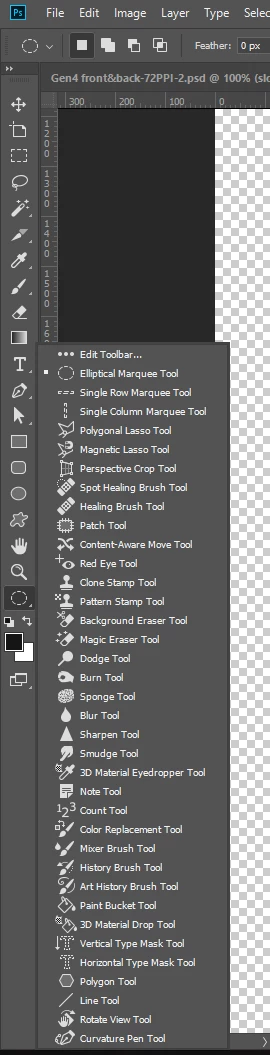
This is very uncomfortable to me, I need every time to go over all this list to find what I need. 😞

how can I change this back to the older version where the tools where grouped into relevant shorter lists per tool?

and for the developers, please let us choose if we want to use it like this, and not install and replace, this layout is not good for all of us with any kind of Dyslexia

thanx 🙂

ilil

[Moved from the Community Help Application forum (which is for a defunct software Adobe made to help people create their own help documentation) to a Photoshop forum - moderator]

This topic has been closed for replies.
Correct answer Barb Binder

The tool display is tied to your workspace in current versions of Photoshop. When you change workspaces (via Window > Workspace), Photoshop hides the tools that are not part of that workflow.

To restore all the tools, you can choose:

Edit > Toolbar > Restore Defaults

-or-

Window > Workspace > Essentials

Window > Workspace > Reset Essentials

(Essentials always shows all the tools)

1 reply

Barb Binder
Community Expert
Barb BinderCommunity ExpertCorrect answer
Community Expert
November 27, 2017

The tool display is tied to your workspace in current versions of Photoshop. When you change workspaces (via Window > Workspace), Photoshop hides the tools that are not part of that workflow.

To restore all the tools, you can choose:

Edit > Toolbar > Restore Defaults

-or-

Window > Workspace > Essentials

Window > Workspace > Reset Essentials

(Essentials always shows all the tools)

~Barb at Rocky Mountain Training
ilx2
ilx2Author
Participating Frequently
November 27, 2017

Thank you for your replay,

it works for me

Barb Binder
Community Expert
Community Expert
November 28, 2017

Yay!

~Barb at Rocky Mountain Training