December 31, 2017
Answered

"next document" issue?

  • December 31, 2017
  • 4 replies
  • 3913 views

first of all, thanks to all of you who meant to help. and srry me for my bad english.

my problem is a little bit wierd, i have an action that works fine like,

select next document

set selection

cut

close --> no

paste

when i batch it, with my template psd file and jpegs opened, it gets the jpegs, cut them, and paste them in to the template as layers.

normally when batching operation close all the jpeg files and just template psd left, it gives the error "the object "next document".. bla bla" and i could close the message and continue to work on my template file with my all jpegs layered..

but all of a sudden, now it closes the psd file also.

the main issue is when one file opened left PS CS3 can still play the "select next document" command, normally i mean as default it shouldnt have to.

and one more thing i noticed, when i have 2 files opened and just clicked the "select next document" command, it changes to "select previous document" automatically,

when i click again it cycles between "previous" and "next"..

soo plx help me, i want the "the object "next document" .. bla bla" error back, when i have just one file left opened..

THX oxoxo

This topic has been closed for replies.
Correct answer JJMack

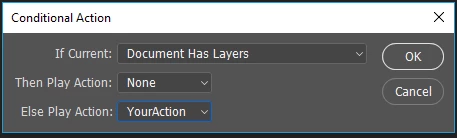
Here is what may work for you if you have a  version of Photoshop the has conditional actions or you download the conditional action script available one the web.

Your batch action is not good. You want to put  some selections of all open document but the first document into the first open doument as an added layer.  You may be able to do the with a conditional action. That plays your action with the select next document removed. if you batch it where your PSD Template document is the active document when you use File>Automate>Batch(open documents).

A single conditional step that plays your action. Does nothing for your layered PSD for the othes  none layered  docyments your action is played.   select, copy, close, paste.

4 replies

January 1, 2018

Ok, at the end of the day we call it a "bug". i just wondered if it was some settings or else. anyways.

Loooottttsssss of thx to you guys for your great help.

this was my first time i asked a question in a forum, and you guys gave me hope.

lots of thx again.

Kukurykus
Legend
January 1, 2018

I wonder what you're going to use as workaround then?

JJMack
Community Expert
JJMackCommunity ExpertCorrect answer
Community Expert
January 1, 2018

Here is what may work for you if you have a  version of Photoshop the has conditional actions or you download the conditional action script available one the web.

Your batch action is not good. You want to put  some selections of all open document but the first document into the first open doument as an added layer.  You may be able to do the with a conditional action. That plays your action with the select next document removed. if you batch it where your PSD Template document is the active document when you use File>Automate>Batch(open documents).

A single conditional step that plays your action. Does nothing for your layered PSD for the othes  none layered  docyments your action is played.   select, copy, close, paste.

JJMack
JJMack
Community Expert
Community Expert
January 1, 2018

isy26814400  wrote

first of all, thanks to all of you who meant to help. and srry me for my bad english.

my problem is a little bit wierd, i have an action that works fine like,

select next document

set selection

cut

close --> no

paste

when i batch it, with my template psd file and jpegs opened, it gets the jpegs, cut them, and paste them in to the template as layers.

I do not understand why you need the select next document.  I feel it should nt be there. I would think the if you batched an action that simply did

set selection

cut

close --> nosave

paste

All the documents that Batch opened would have the selection set cut to the clipboard the document would be closed but the data would not be cut out of it  because you use nosave in the action close step and the clipboard would then be pasted into the current document open in Photoshop.   You would end up with a document that has layers add that contains a selection of other documents that were opened selected copied closed and pasted by your action when batch ends you would be in and document the was the current document when you automated the batch process.  If the current document was opened from a psd files in the same folder as your jpeg when batch  open it batch should through an open error for the document was open in Photoshop if you ignore the error and continue the action would close nosave your current document you opened from that psd file. Make sure you do not have your template file mixed in with your jpeg files. Batch process all image files in a folder not just jpeg.  The Select next document should select the net document in photoshop for example your template.   Photoshop open document list is a ring when two documents are open next and previous become the same thing.

JJMack
January 1, 2018

i first open jpegs and batch the action, thats why i have a "select next document" command there, but your way is much better and simple. thx. i will use this.

but still the select next document thing remains a mystery

JJMack
Community Expert
Community Expert
January 1, 2018

There is a warning about using next and previous in actions things can get mess up if document are added or removed in actions you need to be careful.  I would think your action would not work if the active document is your template document when you use automate batch or If  any one of you other open document is Photoshop active document when you use automate batch open doctments. When the next document is your template a selection will be made  the template will be closed . If you look at your action you see  it seem to me that you action is in effect removing the next document before batch has you process it. What is the next document may be the first document when batch process the last open document. You changing the number of open document on Batch.  Your batch seems to be cutting off its nose.

]If there are 10 documents open and every time the action proces a document a document is closed there will be 10 document closes.  10 open document 10 closed documents leaves no documents open.

JJMack
Kukurykus
Legend
December 31, 2017

if (documents.length == 1) {

     if (len = (fls = Folder.selectDialog('SELECT FOLDER:').getFiles(/\.jpe?g$/i)).length) {

          for(i = 0; i < len; i++) {

               open(fls), (sel = (aD = activeDocument).selection).selectAll(), sel.cut()

               aD.close(SaveOptions.DONOTSAVECHANGES), activeDocument.paste()

          }

     }

     else alert('There are no any .jpg files in chosen folder!')

}

else alert("There's no document opened or there are more than one!")

Copy it to notepad and save as Script.jsx on your desktop. Note that saving files in notepad with other extension you have to take a name - with extension - to double quotes, so when saving you must use exacly this name: "Script.jsx". Copy it to your Presets/Scripts folder in your Photoshop folder. Then reopen Photoshop and you should find your action on File/Scripts list. Before you choose your item open/create new document. You can also make shortcut to that script, so you don't have each time to select it from File / Scripts list but just pressing for example F1 or other key you bound to.

So instead of opening .pds file and then all .jpg files you open only .psd file and then run a script. By the script you choose a folder with your .jpe?g files you want to proecess. Each of them is going to open, be selected, cut, closed without saving and pasted to current .psd file. When the loop is finished Script.jsx stop working, so the error related to selecting next document when there is only one won't occur.

December 31, 2017

thx for the script, i would use it, will be also cool.

but the main problem is i cant get the error related to selecting next document , when only 1 file left opened. it just selects the same file and gives no errror. as i mentioned top.

why this happens?

Kukurykus
Legend
December 31, 2017

This is a bug I experienced in past when I didn't know how to script yet. That drove me crazy so I learned scripting to avoid it. I don't see other way than using a script to omit this situation that happens using actions. Operations are not perfect and very limited, scripts gives you oportunity to do what you want. That program I wrote was to help you with your problem. I guess you looked for something like it . It works and do exactly your action does, and even a bit more (without an error).