Participant
October 3, 2018
Answered

No more right click on import from devices - MAC OS Mojave

  • October 3, 2018
  • 2 replies
  • 555 views

Just updated to Mojave on Mac.

Used to be able to right click on "import images from device."

I can't seem to do that anymore? Although right click still works within photoshop itself.

Hoping for a quick fix... Anything I'm missing?

Thank you.
This topic has been closed for replies.
Correct answer Jeff Arola

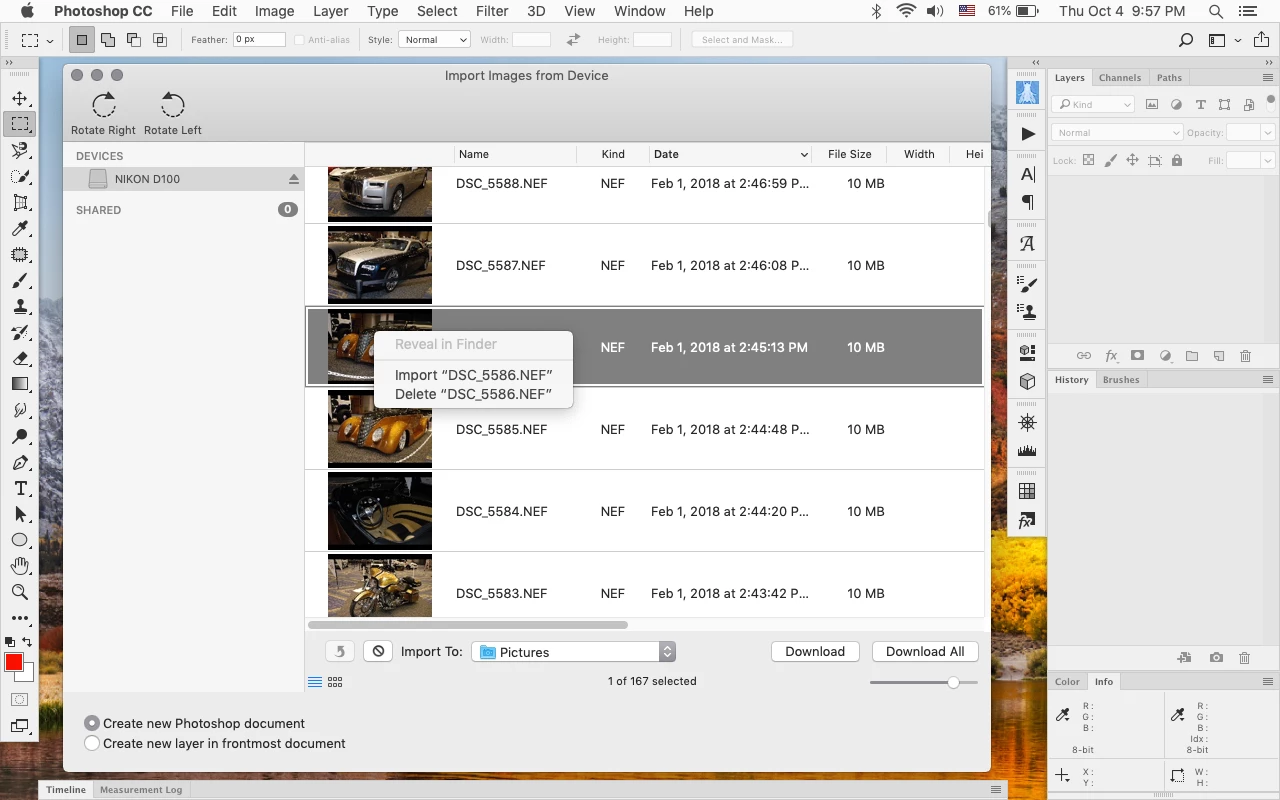
Seems to still work here with a macbook pro and macOS 10.14 Mojave with photoshop cc 19.1.6.

I realize that a screenshot doesn't prove that macOS 10.14 Mojave is the operating system in use, but it is, so maybe we'll here from other users if it's working for them.

2 replies

Jeff Arola
Community Expert
Community Expert
October 3, 2018

Could you clarify what you mean by right click on "import images from device."?

​What version of photoshop?

Participant
October 4, 2018

I'm using Photoshop CC 19.1.6 release.

On a Mac Pro with Mojave 10.14

I'm importing my photos directly from my camera using a USB cable.

So when I bring up the "import images from device" feature on photoshop, I used to be able to right-click on a photo and either import or delete. I no longer have the ability to right-click. Nothing comes up.

Thank you,

D Fosse
Community Expert
Community Expert
October 4, 2018
Sahil.Chawla
Adobe Employee
Adobe Employee
October 3, 2018

Hi there,

We're sorry to hear about this, could you please try resetting the preferences of Photoshop and let us know if it helps with the issue?

Preferences Reset Photoshop - https://helpx.adobe.com/photoshop/using/preferences.html


Note: please make sure that you back up all custom presets, brushes and actions before restoring the preferences.

Regards,
Sahil

Participant
October 3, 2018

Just tried it. Doesn't seem to work...