
Evermorian
Participant
April 22, 2022
Answered

No Plugins at All after 23.3 Update

  • April 22, 2022
  • 2 replies
  • 523 views

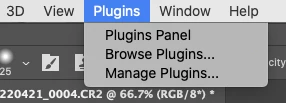
Photoshop updated itself to 23.3 on my (Intel) Mac (MacOS 10.15.7). Now, I have NO plugins at all. I chose “Manage” from the Plugins menu and, searched for “gaussian blur” and, couldn’t find the basic gaussian blur plugin. I gather the way plugins are handled changed dramatically with this version. Is there some simple way to get back a basic set of standard plugins?


I am probably going to roll back to a previous version for now, in order to be able to get back to work while this gets sorted.
 

This topic has been closed for replies.
Correct answer Evermorian

*Sigh*  Nevermind.

2 replies

jane-e
Community Expert
Community Expert
April 22, 2022


@Evermorian wrote:

“gaussian blur” and, couldn’t find the basic gaussian blur plugin.


Gaussian Blur is a filter. Do you see it in Filter > Blur > Gaussian Blur? Let us know either way.


Jane

Evermorian
Participant
April 22, 2022

Yep.  After using Photoshop since version 2 almost daily, this morning I inexplicably decided that the fliters should have been under the Plugins menu.  I figured it out, thus the "nevermind."  I am chalking this one up to stress.


Thank you for responding!

Evermorian
Participant
April 22, 2022

I tried rolling back to 22.2.2 and, there were still no plugins.


I tried restoring from a TimeMachine backup from a couple weeks ago when I know it was working and had plugins and, there were still no plugins.

I uninstalled Photoshop entirely, including letting it delete all preferences and plugins, reinstalled 23.3.1 and, there were still no plugins.


This is unusable.

Evermorian
EvermorianAuthorCorrect answer
Participant
April 22, 2022

*Sigh*  Nevermind.