

jasonamc
Participant
March 17, 2017
Answered

No Preview For Blur Gallery Filters

  • March 17, 2017
  • 2 replies
  • 1860 views

For some reason, when I try to use any filters under the blur gallery, I can't get a preview. I can adjust and apply the filters, but the preview itself is a black screen with the edit pins still visible. The preview box is checked. Can anyone think of something I might've overlooked?

Thanks for your help!
    This topic has been closed for replies.
    Correct answer davescm

    Hi Jason

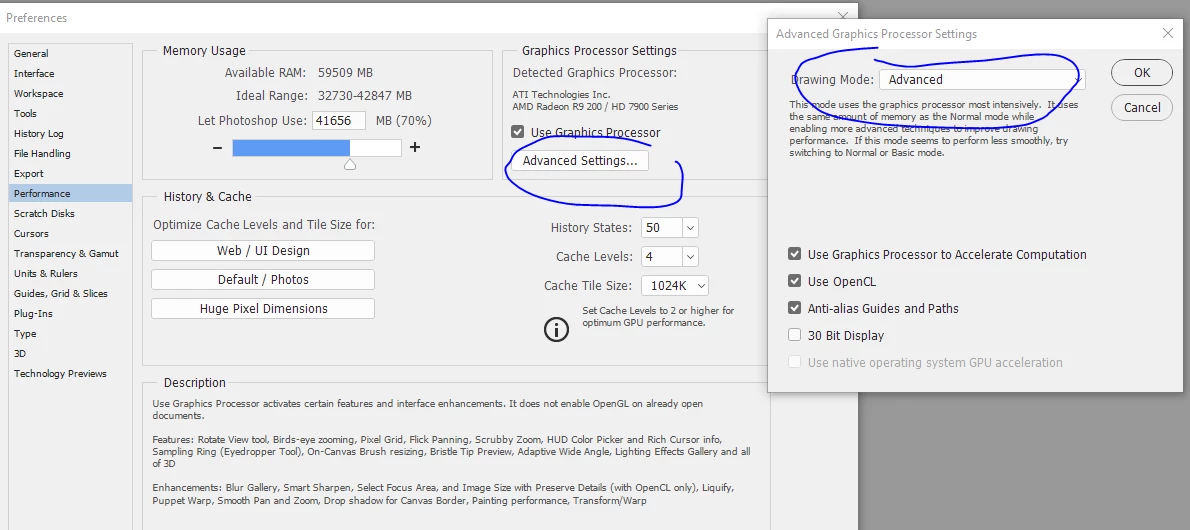
    I've not experienced the symptoms you describe. However the Blur Gallery does use the Graphics Processor, so I would try:

    1. Alternative drawing modes in Preferences - Performance - Graphics Processor settings - Advanced.
    Try the Advanced , Normal and Basic settings and see if any make a difference.

    You will need to restart after clicking OK to see the difference

    2. Check your video driver is up to date (don't rely on Windows updates for this - go to the manufacturer site)

    Dave

    2 replies

    Stellar_elegance1549
    Participant
    July 26, 2020

    I had the same problem and did all what was suggested with the Advanced settings. It didn't work for me. I opened my Blur Gallery, I went in to the menu
    VIEW/SHOW/EDIT PINS
    it worked. It's simple, but it took me a long time to work it out.


    Participant
    July 11, 2023

    Thx!

    jasonamc
    jasonamcAuthor
    Participant
    March 21, 2017

    Bump, still not resolved. Any ideas are welcome, thanks!

    davescm
    Community Expert
    davescmCommunity ExpertCorrect answer
    Community Expert
    March 21, 2017

    Hi Jason

    I've not experienced the symptoms you describe. However the Blur Gallery does use the Graphics Processor, so I would try:

    1. Alternative drawing modes in Preferences - Performance - Graphics Processor settings - Advanced.
    Try the Advanced , Normal and Basic settings and see if any make a difference.

    You will need to restart after clicking OK to see the difference

    2. Check your video driver is up to date (don't rely on Windows updates for this - go to the manufacturer site)

    Dave

    jasonamc
    jasonamcAuthor
    Participant
    March 22, 2017

    Thanks a ton Dave, that did the trick! I had to switch to basic mode to bring up the preview, which doesn't make a lot of sense to be only because I have a brand new mac with an i7 processor and Intel Iris Pro Graphics 6200 1536 MB, plus 16 GB of memory. Maybe there's some kind of allocation limit/setting on my graphics processor, but at least now I know where to look.

    Thanks again for the help, you're great and the issue is resolved!