
Participant
February 13, 2024
Answered

Not able to convert text to shape or wrap the text around object

  • February 13, 2024
  • 1 reply
  • 2787 views

I was trying to get an effect in photoshop for "photo manipulation typography" for which i needed to convert text to shape so that I can wrap it around the object/Image. Every time I tried doing this i got an error showing "Couldnot complete you request because the type layer uses a faux bold style." 

I tried changing the font as well but nothing helped. Please let me know how can this be solved
This topic has been closed for replies.
Correct answer thatsmauri

Hi Shenaz255326171uha,


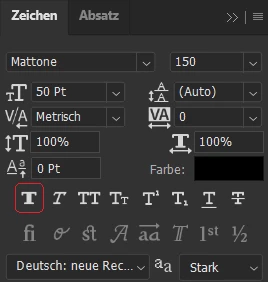
inside the Character panel (Window > Character), deactivate the "Faux Bold" option while having your

text layer selected.


Then try converting your text to shape again.


Best,

Maurice

1 reply

thatsmauri
Community Expert
thatsmauriCommunity ExpertCorrect answer
Community Expert
February 13, 2024

Hi Shenaz255326171uha,


inside the Character panel (Window > Character), deactivate the "Faux Bold" option while having your

text layer selected.


Then try converting your text to shape again.


Best,

Maurice

Participant
February 13, 2024

Thank you so much. That solved the convert text issue but now I am not seeing the option to wrap the text after converting it to shape

Participant
February 13, 2024

The problem is resolved. Thank you so much for the guidance