Participant
August 2, 2021
Answered

Not able to open, create new file or exit photoshop

  • August 2, 2021
  • 1 reply
  • 418 views

From the past 4 days I am not able to create any new files, open any image neither close my Photoshop desktop app. I tried uninstalling photoshop and creative cloud and reinstalled again. But still resolved my issue. Is there ant solution for this issue. I have more than 500GB left on my drive and Photoshop is the latest version.
This topic has been closed for replies.
Correct answer Alexneptunepools

Thanks Eugenio for you reply.

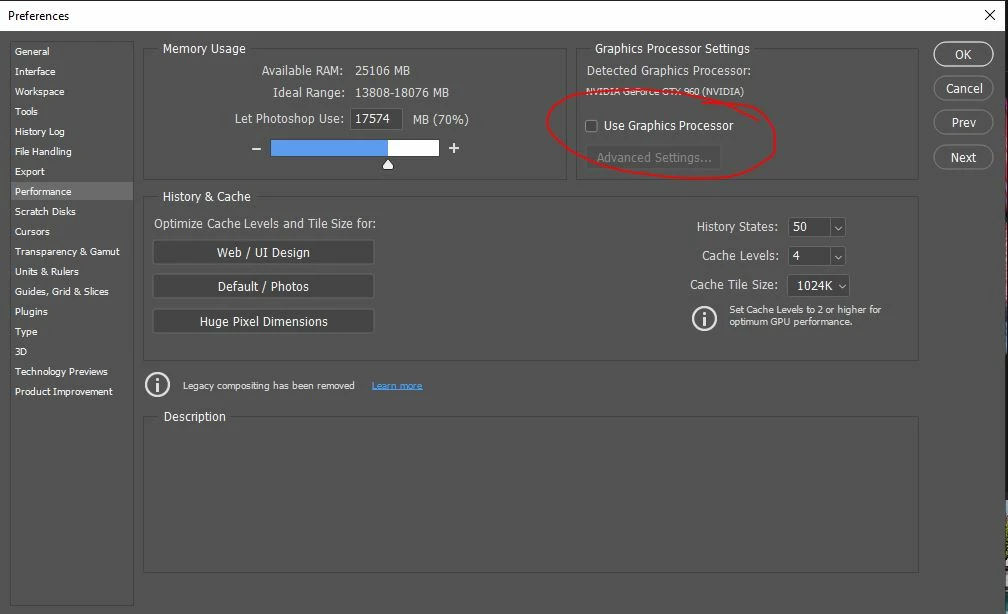
I turned off the 'Use Graphics Processor' in Performance tab and now it works.

Think Ps 2.4.3 has come compatibilty issue with my graphics card!! Dont know

1 reply

Eugenio.NYC
Participating Frequently
August 3, 2021

Hi, sorry about that

I don’t have a solution, but maybe if you install a previous version of Photoshop
Go to the creative cloud app and click on the 3 dots next to Photoshop app to see more options and select other versions
you can install a previous version of Photoshop and maybe that will work, sometimes there are bugs and you have to update the system
Let me know if that works

E

AlexneptunepoolsAuthorCorrect answer
Participant
August 4, 2021

Thanks Eugenio for you reply.

I turned off the 'Use Graphics Processor' in Performance tab and now it works.

Think Ps 2.4.3 has come compatibilty issue with my graphics card!! Dont know