Participant
May 21, 2018
Answered

Not being able to access filter gallery

  • May 21, 2018
  • 2 replies
  • 790 views

Hey guys im working on a personal project and i really need the filter gallery but for some reason it is blanked out and i cant click it

i have tried selecting my layer that i want the filters to be applied on but still no access to the filter gallery
    This topic has been closed for replies.
    Correct answer

    Hi

    You really need to provide more info like what OS and Photoshop version have you and systems specs would help.

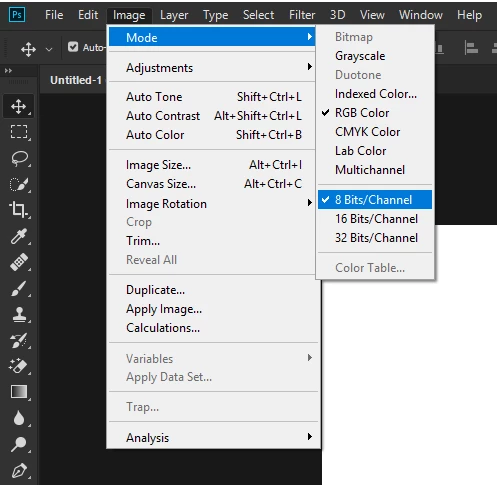
    A couple of things to check, make sure that your working in the right Color mode, go to Image > Mode

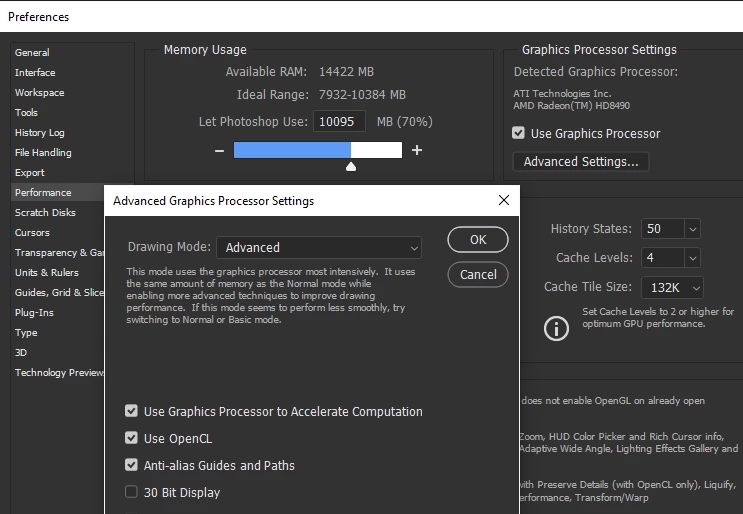
    Check in preferences that your GPU is enabled

    Also take a look here

    Troubleshoot Photoshop graphics processor (GPU) and graphics driver issues

    2 replies

    davescm
    Community Expert
    Community Expert
    May 21, 2018

    Hi

    Is you document 8 bits/channel RGB (Image >Mode)? Filter gallery will not work with 16 bit or 32 bits documents or CMYK

    Dave

    Correct answer
    May 21, 2018

    Hi

    You really need to provide more info like what OS and Photoshop version have you and systems specs would help.

    A couple of things to check, make sure that your working in the right Color mode, go to Image > Mode

    Check in preferences that your GPU is enabled

    Also take a look here

    Troubleshoot Photoshop graphics processor (GPU) and graphics driver issues