hamada44915951
Participant
June 13, 2018
Answered

Not enough memory (RAM)? Can't change Performance as well!

  • June 13, 2018
  • 1 reply
  • 896 views

Hi all,

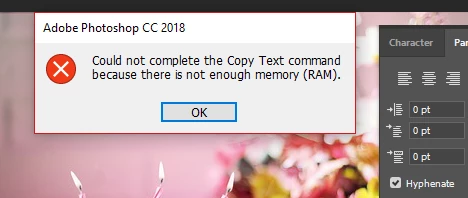
Recently, the Photoshop can't save my work. It says that the RAM-Memory is full. Despite I didn't face this problem on the past. I'm sure there is enough RAM space and I don't open other programs while using Photoshop.

See the error message below:
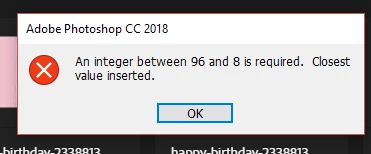
I've tried to change the performance and I got another message:
Any suggestions?

    This topic has been closed for replies.
    Correct answer davescm

    Hi

    Adobe released Photoshop 19.1.5 today which fixes the issue.

    Once installed, to allow Photoshop to manage memory - the temporary fix needs to be removed . See this :

    Error while accessing performance preferences - 'An integer between 96 and 8 is required.'

    Dave

    1 reply

    davescm
    Community Expert
    Community Expert
    June 13, 2018

    Hi

    The problem was caused by a Windows update. Adobe are aware.

    See this for a workaround

    Error while accessing performance preferences - 'An integer between 96 and 8 is required.'

    Dave

    hamada44915951
    Participant
    June 13, 2018

    Thanks so much davescm

    It works problem-free now.

    davescm
    Community Expert
    davescmCommunity ExpertCorrect answer
    Community Expert
    June 19, 2018

    Hi

    Adobe released Photoshop 19.1.5 today which fixes the issue.

    Once installed, to allow Photoshop to manage memory - the temporary fix needs to be removed . See this :

    Error while accessing performance preferences - 'An integer between 96 and 8 is required.'

    Dave