Participant
October 12, 2020
Question

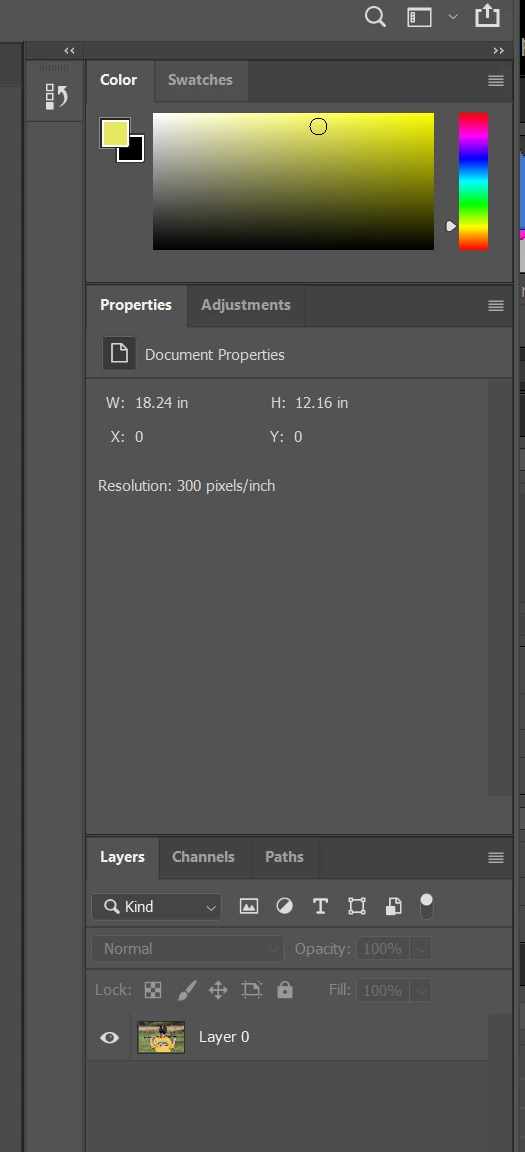
Not seeing options in properties panel with unlocked background image

  • October 12, 2020
  • 2 replies
  • 694 views

I have updated PS CC to the most recent version and am attempting to try out the new features in the properties tab. I unlocked the background image but all I get is the image size, no other options.  What am I not doing? Thanks for any help!


This topic has been closed for replies.

2 replies

JJMack
Community Expert
Community Expert
October 12, 2020

What version of CC are you using.  You have the document targeted not layer 0. What is in the Properties panel depends on what is currently being working on. I'm surprised there are not more document properties ins the panel. Here is what is see on windows 10 PS 2020 version 21.2.4 for  the document and for layer 0 in the panel.

JJMack
Sahil.Chawla
Adobe Employee
Adobe Employee
October 12, 2020

Hi there,

Thanks for reaching out! Would you mind telling us which other options are you trying to access? You can find other panels by going to Windows on top.

Please have a look at this article for more information on what's new in Photoshop: https://helpx.adobe.com/photoshop/using/whats-new.html

Hope this helps.
Regards,
Sahil