


Participant
April 11, 2023
解決済み

Nothing in the folder "Add legacy shapes and more"

  • April 11, 2023
  • 返信数 1.
  • 872 ビュー

I have the last Photoshop 2023 and to find shapes, I follow the tips given on the site to find the legacy shapes (Window > Shapes > Add legacy shapes and more) but, when I click on this folder, nothing appears. Is-it possible to download them elsewhere ? Thank you !
このトピックへの返信は締め切られました。
解決に役立った回答 jane-e

@Stapelia 


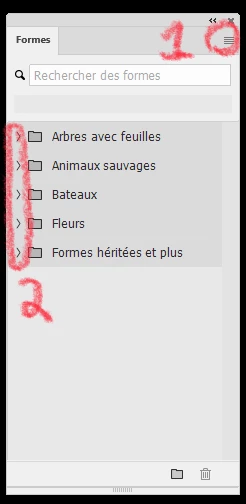
Click the four lines in the upper right (marked "1") to reveal the panel menu. This is where you will find "Legacy Shapes and More". Show a screenshot with the panel and the panel menu if you don't see it.


Click each disclosure triangle ">" (marked "2) to the left of the folders open the folder and reveal the shapes inside. 


Jane

返信数 1

jane-e
Community Expert
Community Expert
April 11, 2023


@Stapelia 


Can you show a screenshot of your Shapes panel with the panel menu open (bars in upper right)?


Jane

Stapelia作成者
Participant
April 11, 2023

This is how the "Forms" menu looks like (my Photoshop is in French). Everything is in grey and nothing can be opened. Trees with leaves, Wild animals, Ships, Flowers, and Legacy shapes & more.


jane-e
Community Expert
jane-eCommunity Expert解決!
Community Expert
April 11, 2023

@Stapelia 


Click the four lines in the upper right (marked "1") to reveal the panel menu. This is where you will find "Legacy Shapes and More". Show a screenshot with the panel and the panel menu if you don't see it.


Click each disclosure triangle ">" (marked "2) to the left of the folders open the folder and reveal the shapes inside. 


Jane