Participant
November 12, 2021
Answered
Object Selection Tool Causes Layer to Turn Blue
- November 12, 2021
- 1 reply
- 4243 views

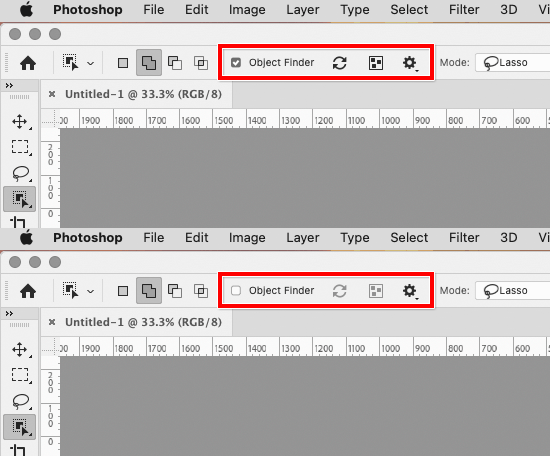
Before you turn it off, study how the new Object Finder option works. When an area of a layer turns blue, that means the new Object Finder feature has identified an object, so all you have to do is click the blue silhouette and it turns into a selection. Just clicking to select is faster and less effort than having to drag that tool around the object.
It can identify multiple subjects on a layer. There is an option to Mask All Objects, which in one step creates a separate mask for each identified object on a layer. Overall, Object Finder has the potential to save large amounts of time.
If you must use it the older, slower way, turn off Object Finder.
Already have an account? Login
Enter your E-mail address. We'll send you an e-mail with instructions to reset your password.
 AdChoices