
Slow Montana
Participant
January 11, 2024
Answered

Objekt-Anfasser verschwunden | Object handles disappeared - PS 2024, macOS 14.2.1, Sonoma

  • January 11, 2024
  • 1 reply
  • 576 views

Hi community,
I installed Photoshop 2024 on my new Mac (macOS 14.2.1, Sonoma). Unfortunately, the "handles" are not displayed when selecting an object, so manual resizing or rotating the objects is not possible. All the solutions I found either don't work for me  or refer to older PS versions.

Maybe I accidentally entered a key combination that I didn't recognize...?


Can someone give me a hint?
Best regards, Markus


____________


Hi Community,
Ich habe Photoshop 2024 auf meinem neuen Mac (macOS 14.2.1, Sonoma) installiert. Leider werden die „Griffe“ bei der Auswahl eines Objekts nicht angezeigt, sodass eine manuelle Größenänderung oder Drehung der Objekte nicht möglich ist. Alle Lösungen, die ich gefunden habe, funktionieren bei mir entweder nicht oder beziehen sich auf ältere Versionen.

Vielleicht habe ich versehentlich eine Tastenkombination eingegeben, die ich nicht kannte ...

Kann mir jemand einen Hinweis geben?
Grüße, Markus
This topic has been closed for replies.
Correct answer Ged_Traynor

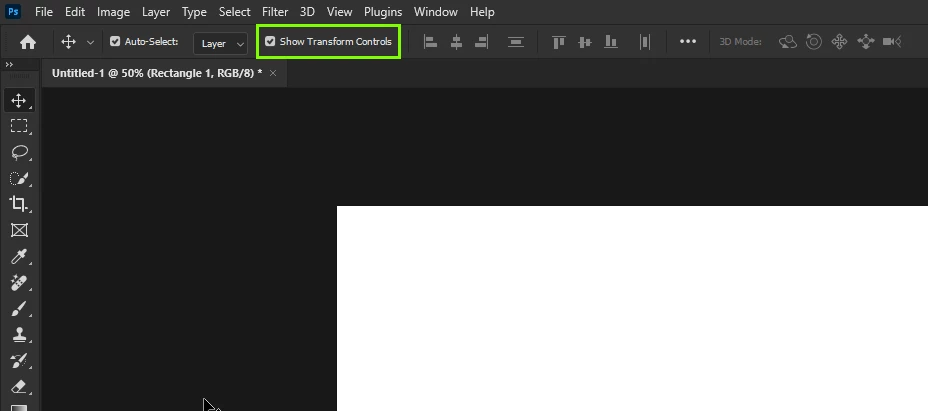
@Slow Montana do you have this option enabled in the options bar

If it's not that you may have hit the CMD + H key, which will hide and unhide the transform handles

1 reply

Ged_Traynor
Community Expert
Ged_TraynorCommunity ExpertCorrect answer
Community Expert
January 11, 2024

@Slow Montana do you have this option enabled in the options bar

If it's not that you may have hit the CMD + H key, which will hide and unhide the transform handles

Slow Montana
Participant
January 11, 2024

Hi Ged_Traynor,

Great, thank you very much - that's exactly it!


Although the button looks completely different (as can be seen below) - and I simply overlooked it - the situation I was hoping for occurred immediately after clicking the button!

Now those handles are shown again.


Thank you for the right tip, your quick answer and for taking the time.

Have a good 2024!

Best regards

Markus


Ged_Traynor
Community Expert
Community Expert
January 11, 2024

@Slow Montana the reason why your options bar looks different to mine is because you have this option enabled in preferences, if you disable it and restart Photoshop you'll see the extended options bar