
lisaellensegal
Inspiring
October 22, 2018
Answered

Odd behavior with clone tool and actions window

  • October 22, 2018
  • 1 reply
  • 328 views

I am running windows 10, Wacom  Intous 5 touch, Adobe Photoshop CC version 20.0.0

I am having strange issues which are slowing down my workflow.

1. Clone tool keeps reverting back to "Aligned" with stylus and with mouse while I am working (during a clone).  I always prefer aligned stay unchecked.

2. I open the history and action windows.  They keep closing down while I am working with no reason.

Can someone please advise?
    This topic has been closed for replies.
    Correct answer Jeff Arola

    The first issue with the clone tool that keeps reverting to Aligned is generally caused by inadvertently double clicking when setting the clone source. Maybe your systems double click speed needs to be adjusted.

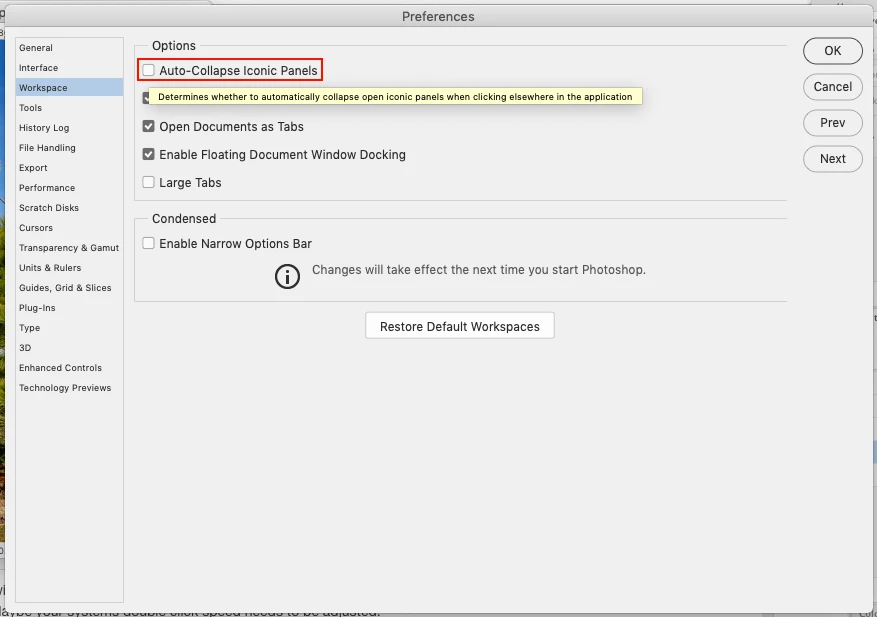
    The second issue can be remedied by going to Edit>Preferences>Workspace and unchecking Auto-Collapse Iconic Panels.

    1 reply

    Jeff Arola
    Community Expert
    Jeff ArolaCommunity ExpertCorrect answer
    Community Expert
    October 23, 2018

    The first issue with the clone tool that keeps reverting to Aligned is generally caused by inadvertently double clicking when setting the clone source. Maybe your systems double click speed needs to be adjusted.

    The second issue can be remedied by going to Edit>Preferences>Workspace and unchecking Auto-Collapse Iconic Panels.