
"Oil" effect on feathered selection
Hi all,
I am coming from old Photoshop CS6 and recently upgraded to CC2018.
I have some plugins that create dark edges around the frames of my pictures, however I noted a flaw that was not occurring in the previous version of PS.
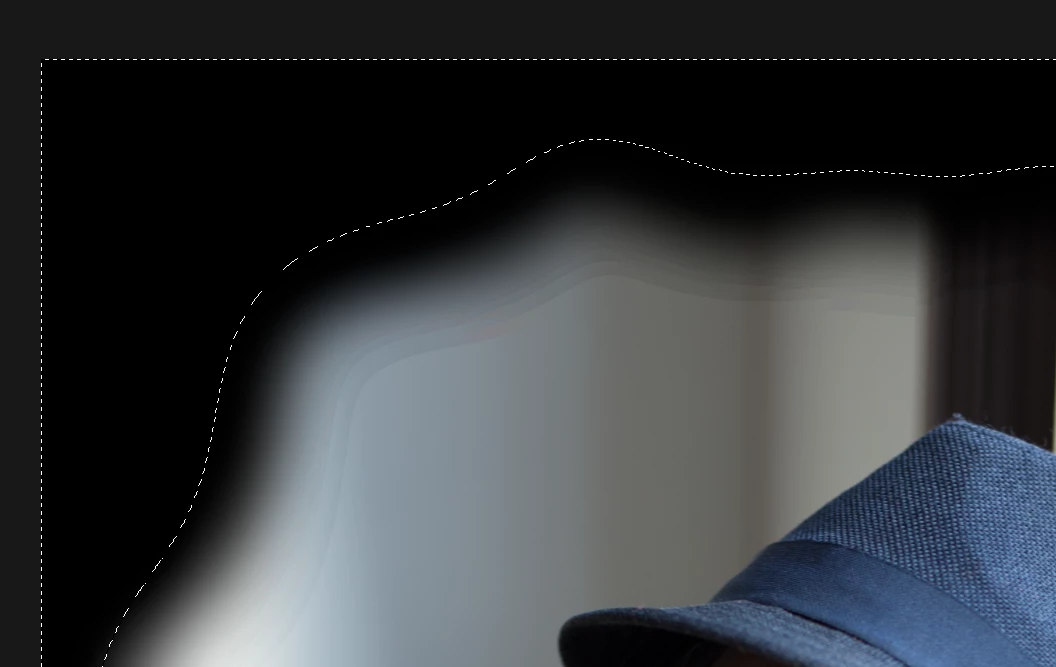
By applying the action steps one after the other I identified the problem to be the selection feather, it creates what I would call an oil effect in which we can basically see the transition between the various intensity levels of the feather whereas in the previous version the feather was completely smooth.
Above you can see the illustration of that, to reproduce it just make a selection with a feather of around 150px, invert it and paint the whole image in black.
Can you see those aweful transitions? This looks quite horrible in the pictures. Again, I am completely sure that this was not occuring in version CS6 since I applied this technique quite frequently.
Are you aware of that, if so, is there a way to prevent it?
Thank you.
 AdChoices