
Participant
February 18, 2017
Answered

Olympus High Res Shot Raw File Photoshop Plug-in

  • February 18, 2017
  • 3 replies
  • 8050 views

Moin, Moin,

nachdem ich mir eine Olympus OMD EM1 Mark II zugelegt habe, habe ich über Olympus einen Plug-in in Photoshop geladen (alles nach den Anweisungen des Olympus Downloads): In  der Oly-Beschreibung heißt es:
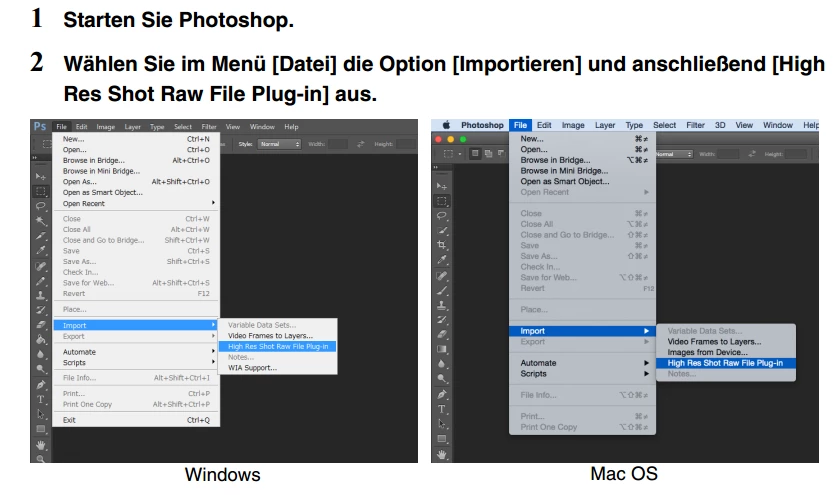
Problem ist nur, dass in Photoshop unter Import... Untermenüpunkt "High res...." nicht ausgewählt werden kann.

Wer kann Helfen?

Beste Grüße

Oliver

This topic has been closed for replies.
Correct answer Jeff Arola

The EM5 Mark II is fully supported in adobe camera raw, so can open those photos in camera raw instead of the Olympus plugin.

Anyhow that Olympus plugin is so darn slow as to be unusable for any serious work.

You'd be better off using the OLYMPUS Viewer 3 to view and edit your Olympus OMD EM1 Mark II high resolution orfs until adobe supports them in camera raw and it's so much faster and has tons of more useful editing tools as compared to the Olympus photoshop plugin.

http://cs.olympus-imaging.jp/en/support/imsg/digicamera/download/software/#ov3

3 replies

Participant
February 19, 2017

Hi,

Thank you

Than I have to

- wait until Olympus also supports the OMD EM1

- but what I dont understand is that i still cannot install the plugin even for the EM5 Mark II

I am using Photoshop CC 2017

BR/Oliver

Jeff Arola
Community Expert
Community Expert
February 19, 2017

Okay, sorry i wasn't sure whether you couldn't install it or couldn't open the files once installed.

On my win 10 x64 system the installer provides a choice as to where to install the plugin like below

On the mac side the installer doesn't give a choice, but must pick the newest version of photoshop, which in my case is photoshop cc 2017.0.1 on mac os x El Capitan.

Which operating system are you using?

If windows, is the operating system 64 bits?

Jeff Arola
Community Expert
Community Expert
February 19, 2017

What operating and version of photoshop are you using?

The plugin only works in 64 bit versions of photoshop, i believe cs5 and newer.

Anyway the plugin seems to install and work on both windows and mac using photoshop cc 2017.0.1, but doesn't

open high resolution orf files from the Olympus OMD EM1 Mark II, but does open the high resolution orfs from the

Olympus E-M5 II.

sample files i tried from here:

Olympus E-M5 II Review - High-Resolution Mode

Olympus E-M1 II Review - Gallery

Camera raw 9.8 doesn't seem to support the Olympus OMD EM1 Mark II high resolution files either.

I wonder if the Olympus plugin has just not been updated for the Olympus OMD EM1 Mark II high resolution files?

JJMack
Community Expert
Community Expert
February 18, 2017

What version of Photoshop? Does ACR support your ORF files? Is Olympus OMD EM1 Mark II, the correct name? All I see in the ACR table are

E-M1ORF8.25.2
E-M1
Mark II ( *** see note )
ORF9.86.8

Grade:

*** Preliminary support available.

OM-D E-M5ORF6.7, 7.14.1
OM-D E-M5 IIORF8.8, 9.06.0
OM-D E-M1ORF8.35.3
OM-D E-M10ORF8.55.5
OM-D E-M10 Mark IIORF9.26.2

E-M1 MARK II $ 1.999.99

E-M1 $ 1.299.99

E-M5 MARK II Starting At $ 1,099.99

E-M10 MARK II Starting At $ 749.99

E-M10

Starting At $ 699.99

JJMack