
JJMack
Community Expert
Community Expert
February 20, 2020
Question

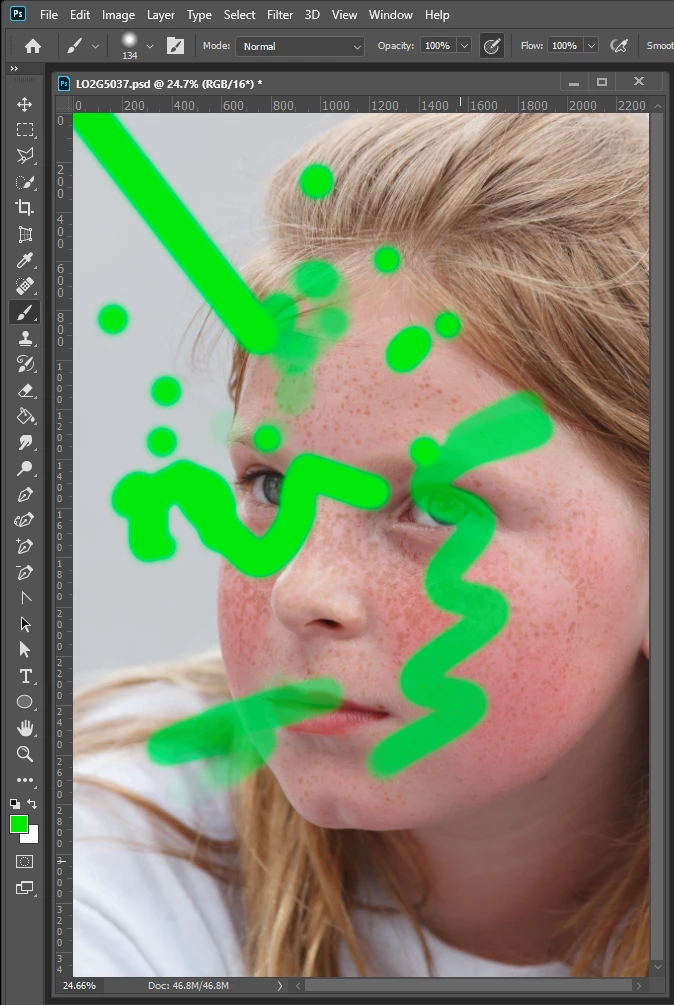
One more stray line thread for 21.1.0

  • February 20, 2020
  • 1 reply
  • 571 views

I use Window 10 A Wacom Intuos Pro and several version of Photoshop configured to use wintab API for pen support.  I thought I did not have a problem with the reported  Stray lines to the upper left. I was wrong. Though I was not having the problem I can now produce it with my Wacom Pen. Not my mouse yet.  Though I normal do not have the problem.  I have set my pen bottom button to Right Alt+Right Click.  Hovering the pen over the tablet with this button press I can set the size and hardness of my brush tip, This works very well and I can use brush tools and brush type tool with my pen. while printing I accidentally touch the bottom pen button. This triggered the stay line bug.  It does not always trigger it but  with a few tries it will trigger the bug. I will try to pin the problem down some more. I'll try other settings and Windows INK to see what effects that they may have.
This topic has been closed for replies.

1 reply

JJMack
Community Expert
JJMackCommunity ExpertAuthor
Community Expert
February 20, 2020

With 21.1.0  and Wacom and Photoshop configures to WinTab API the Pen rocker button can cause stray lines to the upper left with brush type tools even if I set the wacom preferences to disable both rocker buttons. With Photoshop and Wacom Tablet configured to use Windows INK  I can not cause the stray line problem.  However the rocket button set to Alt+Right Click  if quickly press and releases acts more like  Alt+Right Click lock or toggle Photoshop acts like Alt+Right Click are presses till I quickly click the button again.   


WinTab is required for CS3 and CS6 Pen use.  I also have issues using Windows INK with other Photoshop cc version besides version 21.1.0.  Hopefully Adobe will fix the problems.

JJMack
Renderluz
Participating Frequently
February 22, 2020

I have the same problem, I have no idea how to fix it.

JJMack
Community Expert
JJMackCommunity ExpertAuthor
Community Expert
February 22, 2020

Best way is to reinstall 21.0.3

JJMack