Thanks for changing the subject line as this does make it a lot clearer.
I made a new folder/group using the preset menu which allows you to save it.
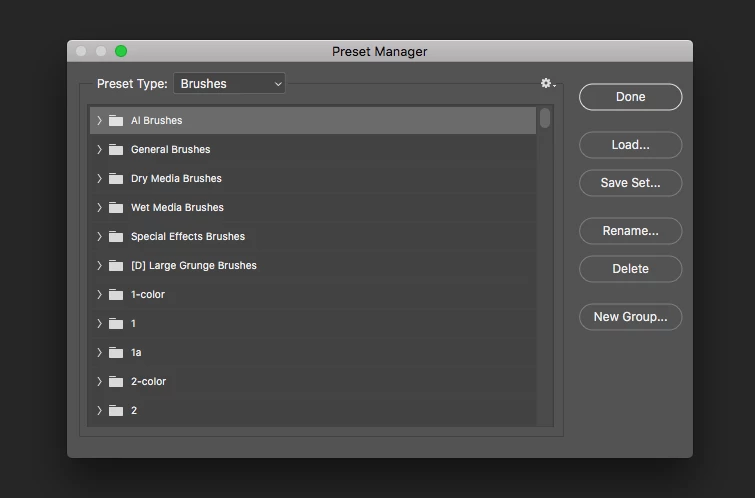
(Discovered how to upload a screenshot too!)
I have been making my own brushes for over a year now and have had no issues at all saving to specific folders/groups and saving and uploading them.
I have currently got photoshop open as have loaded in all my .abr files again.
I have tried using a previous version of photoshop and that came up with the same thing. As soon as I close down photoshop and then reopen it, all I end up with is general brushes, dry media brushes, wet media brushes and special effects brushes.
That is what happened again this morning when I opened photoshop.
This isn't happening to any other area. My loaded gradients, swatches, patterns etc are all fine and are loading fine. They have all be loaded in the same way .... using the preset manager.
I have also tried importing the brushes using the menu you have shown and no luck. I have also tried clicking on the listed brushes individually and even though I get the "restore the brushes to the presets" box and I say oh please do! that doesn't make any difference either.
I have uninstalled every version of photoshop this morning and have then removed every reference to photoshop on my computer. I went through every single folder at every level.
I then installed photoshop CC 2019 again. I then just tried making a brush folder and saving it using presets. Before I shut down I checked that the new.abr file was showing in the right folder and closed down.
When I opened up photoshop ..... just the four brush folders mentioned above.
I have given up for now as I am a photoartist and I need to do some work so I have manually got my brushes in.
It's just so frustrating having to go through a process that is taking nearly an hour every time I want to use photoshop.
I have never had this issue before and other people in my photoart group are saying they have the same issue.
Thank you so much for trying to help though. First place I checked out was the known issues.
I have finally managed to sort out the issue with my brushes.
Interestingly, despite 2 remote access sessions with some very helpful Adobe technical help people, they didn't pick up on this so it may not be widely known.
It turns out that there is a 2gb limit on the brushes you can install. Unlike some of the other presets (ie gradients) there is no warning in the preset manager if you are trying to exceed the limit. If you do exceed this limit, there is no message of any kind but only the default brushes will load. You can delete all the brushes within photoshop but as long as more than 2gb's worth of abr files are in your user library, none will load.
I deleted all my abr files from my user library and made sure I only put back the ones I use the most which came to 1.4gb.
Photoshop is now loading them in automatically with no problems.
I may be missing something very obvious on the Adobe pages but I can't see anything about a limit anywhere on the brush help areas.
I am just so glad to have sorted it one way or another. I would like to suggest that either the preset manager alerts you that you cannot load all your items like it does with gradients and custom shapes or that at least something is very visible on the brush help area to say that there is this limit.

 AdChoices