

dragantomas
Inspiring
April 21, 2023
Question

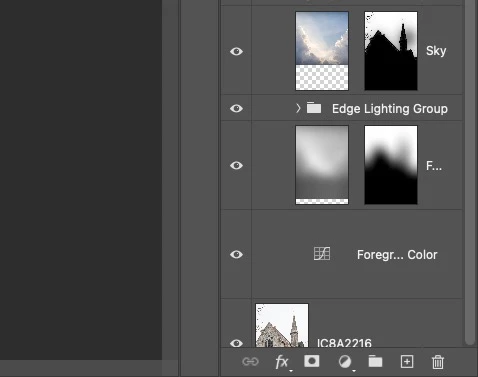
Only half of Background layer icon visible in the layers panel

  • April 21, 2023
  • 1 reply
  • 774 views

Hi there,


I have just reinstalled last version of photoshop, but now when I open an image with lots of layers, then scroll all the way down to the bottom of the layers panel I can only see half of the backgroun layer (see screenshot)


Anyone knows how to make it fully visible again?


Thanks
 

This topic has been closed for replies.

1 reply

Kevin Stohlmeyer
Community Expert
Community Expert
April 21, 2023

Hi @dragantomas go to Preferences (Settings)/Technology Preview and check "Disable Native Canvas" and restart PS.

dragantomas
Inspiring
April 21, 2023

I think you meant to say "Deactivate Native Canvas"? There is no "Disable Native Canvas" option.


I have put a check on "Deactivate Native Canvas" & Photoshop restart but the problem is still there.